
Advanced Next.js Concepts
Section 22: Advanced Next.js Concepts
Section titled “Section 22: Advanced Next.js Concepts”📖 Server Actions are covered in detail on the dedicated page →
22.1 Server Actions
Section titled “22.1 Server Actions”Server Actions are async functions that run on the server but can be called directly from Client Components. They eliminate the need to write separate API routes for form submissions and data mutations.
Simple analogy: Instead of sending a letter to an office and waiting for a reply (API route), Server Actions let you press a button in the lobby that directly updates the filing cabinet inside — no round trip needed.
'use server'; // Every export in this file becomes a Server Action
import { revalidatePath } from 'next/cache';import { redirect } from 'next/navigation';import { z } from 'zod';import { prisma } from '@/lib/prisma';import { getServerSession } from 'next-auth';import { authOptions } from '@/lib/auth/options';
const CreatePostSchema = z.object({  title: z.string().min(1).max(200),  content: z.string().min(1),});
// Server Action — callable from any Client Componentexport async function createPost(formData: FormData) {  // 1. Auth check (runs on server)  const session = await getServerSession(authOptions);  if (!session) {    throw new Error('Unauthorized');  }
  // 2. Extract and validate form data  const raw = {    title: formData.get('title'),    content: formData.get('content'),  };
  const parsed = CreatePostSchema.safeParse(raw);  if (!parsed.success) {    return { error: parsed.error.flatten().fieldErrors };  }
  // 3. DB mutation  await prisma.post.create({    data: {      ...parsed.data,      authorId: session.user.id,    },  });
  // 4. Invalidate cached page data  revalidatePath('/posts');
  // 5. Redirect (runs after response)  redirect('/posts');}
// Server Action with return value (for useFormState)export async function deletePost(postId: string): Promise<{ success: boolean; error?: string }> {  const session = await getServerSession(authOptions);  if (!session) return { success: false, error: 'Unauthorized' };
  try {    await prisma.post.delete({ where: { id: postId } });    revalidatePath('/posts');    return { success: true };  } catch {    return { success: false, error: 'Failed to delete post' };  }}
Using Server Actions in a form:
'use client';
import { useFormState, useFormStatus } from 'react-dom';import { createPost } from '@/app/actions/posts';
// Submit button — shows pending state automaticallyfunction SubmitButton() {  const { pending } = useFormStatus();  return (    <button      type="submit"      disabled={pending}      className="px-4 py-2 bg-blue-600 text-white rounded disabled:opacity-50"    >      {pending ? 'Creating...' : 'Create Post'}    </button>  );}
const initialState = { error: null };
export default function NewPostPage() {  const [state, formAction] = useFormState(createPost, initialState);
  return (    <form action={formAction} className="space-y-4">      <div>        <label htmlFor="title">Title</label>        <input id="title" name="title" required className="border rounded p-2 w-full" />        {state?.error?.title && (          <p className="text-red-500 text-sm">{state.error.title[0]}</p>        )}      </div>
      <div>        <label htmlFor="content">Content</label>        <textarea id="content" name="content" rows={6} className="border rounded p-2 w-full" />        {state?.error?.content && (          <p className="text-red-500 text-sm">{state.error.content[0]}</p>        )}      </div>
      <SubmitButton />    </form>  );}
22.2 Server Actions Flow Diagram
Section titled “22.2 Server Actions Flow Diagram”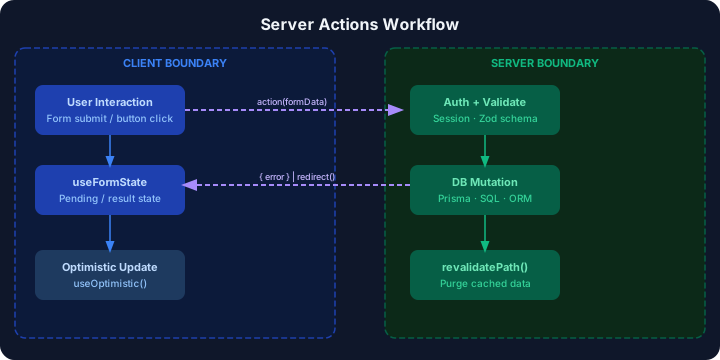
22.3 Server Actions vs API Routes
Section titled “22.3 Server Actions vs API Routes”| Aspect | Server Actions | API Routes |
|---|---|---|
| Location | 'use server' in any file | app/api/route.ts |
| Calling from client | Direct function call | fetch('/api/...') |
| Form integration | Native action={fn} | Needs onSubmit + fetch |
| Typesafety | End-to-end with TypeScript | Manual type casting |
| Revalidation | revalidatePath() built-in | Manual res.revalidate() |
| Boilerplate | Minimal | More verbose |
| External access | ❌ Cannot be called externally | ✅ Public HTTP endpoint |
| Best for | Form mutations, internal data | Public APIs, webhooks |
📖 Streaming & Suspense is covered in detail on the dedicated page →
22.4 Streaming & React Suspense
Section titled “22.4 Streaming & React Suspense”Streaming allows Next.js to send HTML to the browser progressively — the page shell renders immediately while slow data loads in the background. This dramatically improves Time-to-First-Byte (TTFB) and perceived performance.
// app/dashboard/page.tsx — Streaming with Suspenseimport { Suspense } from 'react';import { DashboardStats } from '@/components/DashboardStats';import { RecentOrders } from '@/components/RecentOrders';import { UserActivity } from '@/components/UserActivity';import { StatsLoading, OrdersLoading, ActivityLoading } from '@/components/Skeletons';
// Each component fetches its own data independentlyexport default function DashboardPage() {  return (    <div className="dashboard">      <h1>Dashboard</h1>
      {/* Stats load independently — don't block the page */}      <Suspense fallback={<StatsLoading />}>        <DashboardStats />  {/* Fetches from /api/stats */}      </Suspense>
      <div className="grid grid-cols-2 gap-6">        {/* Orders and activity load in parallel */}        <Suspense fallback={<OrdersLoading />}>          <RecentOrders />  {/* Fetches from /api/orders */}        </Suspense>
        <Suspense fallback={<ActivityLoading />}>          <UserActivity />  {/* Fetches from /api/activity */}        </Suspense>      </div>    </div>  );}
// app/components/DashboardStats.tsx — Server Component with async dataasync function getDashboardStats() { // This runs on the server — can be slow const [revenue, users, orders] = await Promise.all([ fetch('https://api.example.com/revenue').then(r => r.json()), fetch('https://api.example.com/users/count').then(r => r.json()), fetch('https://api.example.com/orders/today').then(r => r.json()), ]); return { revenue, users, orders };}
export async function DashboardStats() { const stats = await getDashboardStats(); // Suspense catches the promise
return ( <div className="grid grid-cols-3 gap-4"> <StatCard label="Revenue" value={stats.revenue} /> <StatCard label="Users" value={stats.users} /> <StatCard label="Orders" value={stats.orders} /> </div> );}22.5 Streaming Lifecycle Diagram
Section titled “22.5 Streaming Lifecycle Diagram”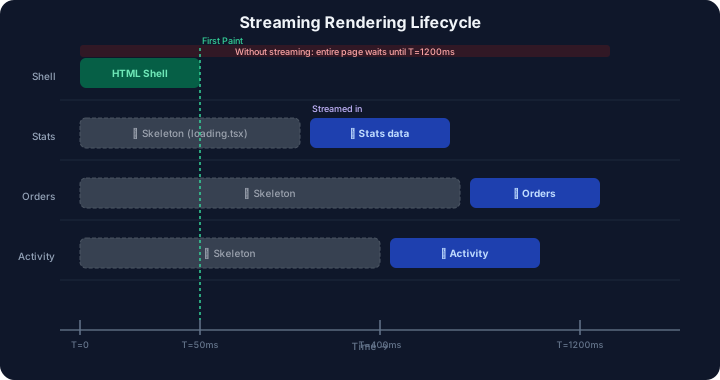
📖 Edge Runtime vs Node.js is covered in detail on the dedicated page →
22.6 Edge Runtime
Section titled “22.6 Edge Runtime”The Edge Runtime runs your code as close to the user as possible using a lightweight V8 isolate (not full Node.js), distributed globally via CDN edge nodes.
// app/api/geo/route.ts — Edge Runtime exampleexport const runtime = 'edge'; // Enable Edge Runtime
export async function GET(request: Request) {  // Access geo data from edge (Vercel only)  const { geo } = request as any;
  return Response.json({    country: geo?.country ?? 'Unknown',    city: geo?.city ?? 'Unknown',    latency: 'sub-10ms', // Response from nearest edge node  });}
// middleware.ts — Middleware ALWAYS runs on Edge Runtimeimport { NextRequest, NextResponse } from 'next/server';
export function middleware(request: NextRequest) { const country = request.geo?.country;
// Redirect based on geography — executed at the edge if (country === 'CN') { return NextResponse.redirect(new URL('/cn', request.url)); }
return NextResponse.next();}22.7 Edge vs Node.js Runtime Comparison
Section titled “22.7 Edge vs Node.js Runtime Comparison”| Feature | Edge Runtime | Node.js Runtime |
|---|---|---|
| Location | CDN edge nodes globally | Single server region |
| Cold start | ~0ms (warm always) | 100ms–500ms |
| Latency | Sub-10ms globally | 50–200ms |
| Memory limit | 128MB | No practical limit |
| Node.js APIs | ❌ Not available | ✅ Full access |
| File system | ❌ No access | ✅ Full access |
| npm packages | Limited (no native bindings) | All packages |
| Database direct | ❌ (use HTTP clients) | ✅ Direct connections |
| Best for | Auth, redirects, A/B tests | Complex logic, DB access |
📖 Parallel & Intercepting Routes are covered in detail on the dedicated page →
22.8 Parallel Routes
Section titled “22.8 Parallel Routes”Parallel Routes allow you to render multiple pages simultaneously in the same layout — perfect for dashboards, split views, or modals.
app/ layout.tsx ← Contains @team and @analytics slots @team/ page.tsx ← Renders in team slot @analytics/ page.tsx ← Renders in analytics slot page.tsx// app/layout.tsx — Root layout with parallel route slotsinterface LayoutProps { children: React.ReactNode; team: React.ReactNode; // @team slot analytics: React.ReactNode; // @analytics slot}
export default function Layout({ children, team, analytics }: LayoutProps) { return ( <div className="grid grid-cols-[1fr_300px] gap-6"> <div className="main-content"> {children} </div> <aside className="sidebar space-y-6"> {team} {/* Renders app/@team/page.tsx */} {analytics} {/* Renders app/@analytics/page.tsx */} </aside> </div> );}22.9 Intercepting Routes
Section titled “22.9 Intercepting Routes”Intercepting Routes let you display content in a modal or overlay while keeping the original URL and allowing direct navigation to the full page.
app/ photos/ [id]/ page.tsx ← Full photo page (direct navigation) @modal/ (.)photos/[id]/ ← (.) intercepts same-level route page.tsx ← Photo shown in modal layout.tsx ← Contains the @modal slot// app/@modal/(.)photos/[id]/page.tsx — Intercepting modalimport { PhotoModal } from '@/components/PhotoModal';
export default function PhotoModalPage({ params }: { params: { id: string } }) { return <PhotoModal photoId={params.id} />;}// app/photos/[id]/page.tsx — Full page (when accessed directly)import { PhotoDetail } from '@/components/PhotoDetail';
export default function PhotoPage({ params }: { params: { id: string } }) { return <PhotoDetail photoId={params.id} />;}Interception conventions:
| Convention | Intercepts |
|---|---|
(.) | Same level |
(..) | One level up |
(..)(..) | Two levels up |
(...) | From root app/ |
22.10 Route Hierarchy Diagram
Section titled “22.10 Route Hierarchy Diagram”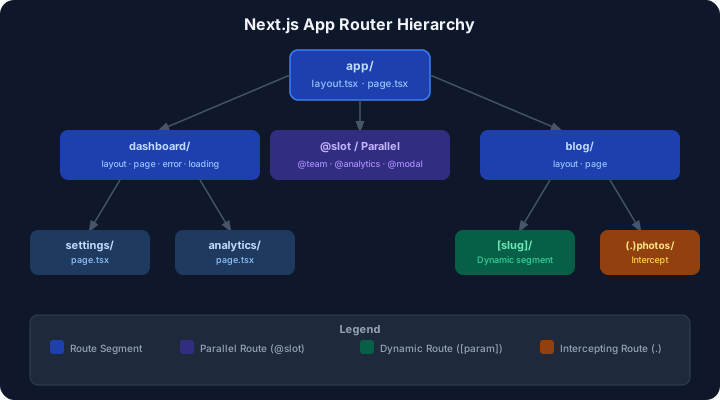
📖 Caching & Revalidation is covered in detail on the dedicated page →
22.11 Caching Strategies
Section titled “22.11 Caching Strategies”Next.js has a multi-layered caching system. Understanding it is critical for performance.
| Cache Layer | What It Caches | Duration | Invalidation |
|---|---|---|---|
| Request Memoization | Duplicate fetch() calls in one render | Per request | Automatic |
| Data Cache | fetch() response data | Persistent | revalidatePath(), revalidateTag() |
| Full Route Cache | Rendered HTML + RSC payload | Persistent | Rebuild / revalidation |
| Router Cache | Client-side route segments | 30s–5min | Manual router.refresh() |
// lib/data/posts.ts — Caching examples
// 1. Static cache — cached until revalidation (default)export async function getPosts() {  const res = await fetch('https://api.example.com/posts', {    next: { tags: ['posts'] }, // Tag for targeted revalidation  });  return res.json();}
// 2. Time-based revalidation (ISR behavior)export async function getPopularPosts() {  const res = await fetch('https://api.example.com/posts/popular', {    next: { revalidate: 3600 }, // Revalidate every hour  });  return res.json();}
// 3. No cache — always fresh (dynamic)export async function getLivePrices() {  const res = await fetch('https://api.example.com/prices', {    cache: 'no-store', // Never cache  });  return res.json();}
// 4. Tag-based revalidation in a Server Actionimport { revalidateTag } from 'next/cache';
export async function publishPost(id: string) {  'use server';  await prisma.post.update({ where: { id }, data: { published: true } });  revalidateTag('posts'); // Invalidates all fetches tagged with 'posts'}
22.12 Static vs Dynamic Rendering
Section titled “22.12 Static vs Dynamic Rendering”| Aspect | Static Rendering | Dynamic Rendering |
|---|---|---|
| When | At build time | Per request |
| Speed | ⚡ Fastest (pre-built HTML) | Slower (real-time) |
| Data | Fixed at build | Always fresh |
| Use case | Blog, marketing, docs | Dashboard, user-specific pages |
| CDN cacheable | ✅ Yes | ❌ No |
| Personalization | ❌ None | ✅ Full |
| Triggered by | Default behavior | cookies(), headers(), searchParams, no-store |
// generateStaticParams → Static (pre-rendered at build time)export async function generateStaticParams() {  const posts = await getPosts();  return posts.map(post => ({ slug: post.slug }));}
// If a slug isn't pre-rendered, generate it dynamicallyexport const dynamicParams = true; // default: true
export default async function BlogPost({ params }: { params: { slug: string } }) {  const post = await getPost(params.slug);  return <article>{post.content}</article>;}
// app/dashboard/page.tsx — Forces dynamic renderingimport { cookies } from 'next/headers'; // Opting into dynamic rendering
export default async function Dashboard() { const sessionCookie = cookies().get('session'); // Makes page dynamic const userData = await getUserData(sessionCookie?.value);
return <DashboardView user={userData} />;}22.13 Rendering Workflow Diagram
Section titled “22.13 Rendering Workflow Diagram”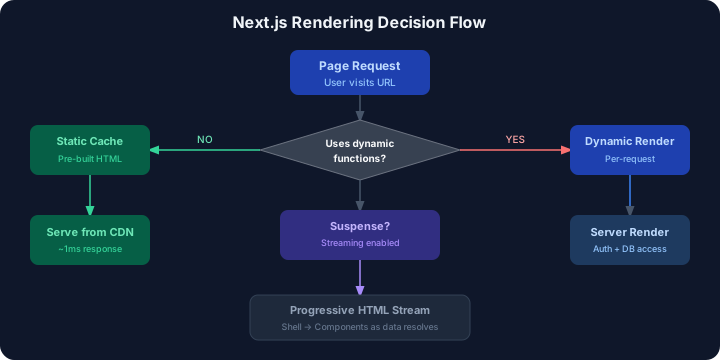
22.14 Practical Examples
Section titled “22.14 Practical Examples”Dashboard Application with Streaming
Section titled “Dashboard Application with Streaming”import { Suspense } from 'react';import { RevenueChart } from '@/components/RevenueChart';import { LatestInvoices } from '@/components/LatestInvoices';import { CardSkeleton, ChartSkeleton } from '@/components/Skeletons';import { fetchCardData } from '@/lib/data';
export default async function DashboardPage() { // Fast data — loaded immediately const cardData = await fetchCardData();
return ( <main> {/* Static data — renders immediately */} <SummaryCards data={cardData} />
{/* Slow chart — streamed in with skeleton */} <Suspense fallback={<ChartSkeleton />}> <RevenueChart /> </Suspense>
{/* Latest invoices — streamed independently */} <Suspense fallback={<CardSkeleton />}> <LatestInvoices /> </Suspense> </main> );}Real-time Chat with Server Actions & Optimistic UI
Section titled “Real-time Chat with Server Actions & Optimistic UI”'use client';
import { useOptimistic, useRef } from 'react';import { sendMessage } from '@/app/actions/chat';
interface Message { id: string; text: string; author: string; pending?: boolean;}
export default function ChatRoom({ roomId, initialMessages, userId,}: { roomId: string; initialMessages: Message[]; userId: string;}) { const [optimisticMessages, addOptimisticMessage] = useOptimistic< Message[], string >( initialMessages, (state, newText) => [ ...state, { id: crypto.randomUUID(), text: newText, author: userId, pending: true }, ] );
const ref = useRef<HTMLFormElement>(null);
async function handleSubmit(formData: FormData) { const text = formData.get('message') as string; ref.current?.reset();
// Optimistically add message immediately addOptimisticMessage(text);
// Then send to server await sendMessage({ roomId, text, userId }); }
return ( <div className="flex flex-col h-screen"> <div className="flex-1 overflow-y-auto p-4 space-y-2"> {optimisticMessages.map(msg => ( <div key={msg.id} className={`p-2 rounded ${msg.pending ? 'opacity-50' : ''}`} > <span className="font-bold">{msg.author}:</span> {msg.text} {msg.pending && <span className="text-xs ml-2 text-gray-400">sending...</span>} </div> ))} </div>
<form ref={ref} action={handleSubmit} className="p-4 flex gap-2"> <input name="message" placeholder="Type a message..." className="flex-1 border rounded px-3 py-2" required /> <button type="submit" className="px-4 py-2 bg-blue-600 text-white rounded"> Send </button> </form> </div> );}E-commerce with Parallel Routes + Intercepting
Section titled “E-commerce with Parallel Routes + Intercepting”// app/shop/@cart/default.tsx — Cart slot (always visible)import { getCart } from '@/lib/cart';
export default async function CartSidebar() { const cart = await getCart();
return ( <div className="cart-sidebar"> <h3>Cart ({cart.items.length})</h3> {cart.items.map(item => ( <CartItem key={item.id} item={item} /> ))} <p className="font-bold">Total: ${cart.total}</p> </div> );}// app/shop/@modal/(.)product/[id]/page.tsx — Quick-view modalimport { Modal } from '@/components/Modal';import { getProduct } from '@/lib/products';
export default async function QuickView({ params }: { params: { id: string } }) { const product = await getProduct(params.id);
return ( <Modal> <div className="p-6"> <h2>{product.name}</h2> <p>{product.description}</p> <AddToCartButton productId={product.id} /> </div> </Modal> );}22.15 Best Practices for Advanced Concepts
Section titled “22.15 Best Practices for Advanced Concepts”- ✅ Use Server Actions for all form mutations — eliminates boilerplate API routes
- ✅ Always validate Server Action inputs on the server (Zod) — client bypass is trivial
- ✅ Add
useFormStatusto submit buttons to prevent double-submission - ✅ Use
useOptimisticfor instant UI feedback on chat/list operations - ✅ Tag fetches with
next: { tags: ['...'] }for precise cache invalidation - ✅ Wrap slow data-fetching components in
<Suspense>for streaming - ✅ Choose
cache: 'no-store'only when data truly must be real-time - ✅ Use Edge Runtime for auth/redirects, Node.js for heavy DB/file operations
- ✅ Use Parallel Routes for dashboards requiring independent data fetches
- ✅ Test static/dynamic rendering behavior with
next build && next start
22.16 Common Mistakes in Advanced Concepts
Section titled “22.16 Common Mistakes in Advanced Concepts”| Mistake | Problem | Fix |
|---|---|---|
Marking Server Actions 'use client' | Breaks — they must be 'use server' | Move to separate .ts file with 'use server' |
| Fetching same data in multiple components | N+1 requests | Use request memoization (same fetch URL) |
No Suspense around slow components | Entire page waits | Wrap each slow component individually |
Using cache: 'no-store' everywhere | Kills performance | Use it only for real-time data |
Not calling revalidatePath after mutation | Stale UI after action | Always revalidate after Server Action |
| Mixing Edge + Node packages | Runtime crash | Check compatibility before setting export const runtime = 'edge' |
No default.tsx in parallel route slots | 404 on direct navigation | Add default.tsx to every slot |
22.17 Interview Questions — Advanced Concepts
Section titled “22.17 Interview Questions — Advanced Concepts”Beginner:
- What is a Server Action in Next.js and how is it different from an API route?
- What does
'use server'mean at the top of a file? - How does
loading.tsxuse React Suspense under the hood?
Intermediate:
4. How do you invalidate the Next.js data cache after a Server Action mutation?
5. What is the difference between revalidatePath and revalidateTag?
6. When would you choose Edge Runtime over Node.js Runtime?
Advanced: 7. How does Next.js streaming work at the HTTP protocol level (transfer-encoding: chunked)? 8. Explain request memoization in Next.js — when does it apply and what are its limits? 9. Design the routing structure for a photo app where clicking a photo shows a modal, but direct URL access shows a full page.