
Installing Next.js
2. Installing Next.js
Section titled “2. Installing Next.js”System Requirements
Section titled “System Requirements”Before installing Next.js, ensure you have:
| Requirement | Minimum Version | Recommended |
|---|---|---|
| Node.js | 18.17.0 | 20.x LTS or later |
| npm | 9.x | 10.x |
| OS | Windows / macOS / Linux | Any modern OS |
| RAM | 4GB | 8GB+ |
| Disk | 1GB free | 5GB+ |
Check your Node version:
node --version # Should show v18.17.0 or highernpm --version # Should show 9.x or higherInstalling Node.js
Section titled “Installing Node.js”If you don’t have Node.js, install it from nodejs.org.
Recommended: Use a version manager
# Install nvm (Node Version Manager) on macOS/Linuxcurl -o- https://raw.githubusercontent.com/nvm-sh/nvm/v0.39.7/install.sh | bash
# Install and use the latest LTSnvm install --ltsnvm use --lts# On Windows, use nvm-windows or fnmwinget install Schniz.fnmfnm install --ltsfnm use lts-latestCreating a New Next.js Project
Section titled “Creating a New Next.js Project”Using npm (default)
Section titled “Using npm (default)”npx create-next-app@latest my-appUsing yarn
Section titled “Using yarn”yarn create next-app my-appUsing pnpm
Section titled “Using pnpm”pnpm create next-app my-appUsing bun
Section titled “Using bun”bunx create-next-app my-appInteractive Setup Prompts
Section titled “Interactive Setup Prompts”When you run the command, you’ll be asked:
What is your project named? › my-appWould you like to use TypeScript? › Yes ✓Would you like to use ESLint? › Yes ✓Would you like to use Tailwind CSS? › Yes ✓Would you like your code inside a `src/` directory? › NoWould you like to use App Router? (recommended) › Yes ✓Would you like to use Turbopack for `next dev`? › Yes ✓Would you like to customize the import alias (@/*)? › NoBest Practice: Always say Yes to TypeScript, App Router, and ESLint for any serious project.
Key Configuration Explanations
Section titled “Key Configuration Explanations”TypeScript
Section titled “TypeScript”Next.js has first-class TypeScript support. Choosing TypeScript generates .tsx/.ts files and a tsconfig.json. TypeScript catches bugs at compile time before they reach production.
ESLint
Section titled “ESLint”ESLint is a linter that enforces code quality rules. Next.js ships with eslint-config-next, which includes rules specific to Next.js like requiring <Image> instead of <img>.
Tailwind CSS
Section titled “Tailwind CSS”Tailwind is a utility-first CSS framework. Next.js sets it up with tailwind.config.ts and postcss.config.js automatically.
App Router
Section titled “App Router”The App Router (introduced in Next.js 13) uses React Server Components by default. It lives inside the app/ folder. Always choose App Router for new projects — the older Pages Router is legacy.
Turbopack
Section titled “Turbopack”Turbopack is Next.js’s new Rust-based bundler, replacing Webpack. It’s significantly faster for development. Stable as of Next.js 15.
Development Server
Section titled “Development Server”cd my-appnpm run dev # Start dev server at http://localhost:3000With Turbopack (default in v15):
npm run dev # Automatically uses Turbopack| Command | Purpose |
|---|---|
npm run dev | Start development server with hot reload |
npm run build | Create optimized production build |
npm start | Start production server (after build) |
npm run lint | Run ESLint checks |
Production Build
Section titled “Production Build”npm run buildThis generates:
- Optimized JavaScript bundles
- Prerendered HTML for static pages
- Server bundles for dynamic routes
npm start # Serves the production build locallyGenerated Files Explained
Section titled “Generated Files Explained”After running create-next-app, you’ll see:
my-app/├── app/│ ├── favicon.ico│ ├── globals.css│ ├── layout.tsx ← Root layout (wraps all pages)│ └── page.tsx ← Home page (renders at /)├── public/│ ├── next.svg│ └── vercel.svg├── .eslintrc.json ← ESLint configuration├── .gitignore ← Git ignored files├── next.config.ts ← Next.js configuration├── package.json ← Dependencies and scripts├── postcss.config.mjs ← PostCSS for Tailwind├── tailwind.config.ts ← Tailwind configuration└── tsconfig.json ← TypeScript configurationnext.config.ts
Section titled “next.config.ts”import type { NextConfig } from "next";
const nextConfig: NextConfig = { // Enable React strict mode for catching bugs early reactStrictMode: true,
// Configure allowed image domains images: { remotePatterns: [ { protocol: "https", hostname: "example.com", }, ], },};
export default nextConfig;tsconfig.json (key parts)
Section titled “tsconfig.json (key parts)”{ "compilerOptions": { "target": "ES2017", "lib": ["dom", "dom.iterable", "esnext"], "strict": true, // Enable all strict type checks "paths": { "@/*": ["./*"] // Import alias: @/components = ./components } }}SVG: Development Workflow
Section titled “SVG: Development Workflow”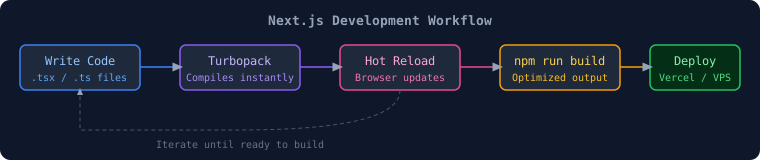
Package Manager Comparison
Section titled “Package Manager Comparison”| Feature | npm | yarn | pnpm | bun |
|---|---|---|---|---|
| Speed | Moderate | Fast | Very Fast | Fastest |
| Disk Usage | High | High | Low (symlinks) | Low |
| Lockfile | package-lock.json | yarn.lock | pnpm-lock.yaml | bun.lockb |
| Workspaces | ✅ | ✅ | ✅ | ✅ |
| Stability | Most stable | Very stable | Stable | Newer |
| Recommendation | ✅ Default | Good choice | Best for monorepos | Fastest builds |
Troubleshooting Common Issues
Section titled “Troubleshooting Common Issues”| Error | Cause | Fix |
|---|---|---|
Node version too old | Node < 18.17 | Update Node.js |
EACCES permission denied | Wrong npm permissions | Use nvm or fix npm permissions |
Port 3000 already in use | Another process | npx kill-port 3000 |
Module not found | Missing package | npm install |
Hydration mismatch | Server/client HTML differs | Check for browser-only APIs in RSC |
Cannot read properties of undefined | Async data not awaited | Use async/await properly |
📝 Interview Questions — Section 2
Section titled “📝 Interview Questions — Section 2”Beginner:
- What is the minimum Node.js version required for Next.js 14+?
- What does
npm run builddo differently fromnpm run dev? - What is the App Router and when was it introduced?
Intermediate:
4. What is Turbopack and how does it differ from Webpack?
5. Explain the role of next.config.ts in a Next.js project.
6. What is the significance of reactStrictMode: true?
Advanced:
7. How would you configure Next.js to support multiple environments (dev/staging/prod)?
8. Explain how tsconfig.json path aliases improve code maintainability in large projects.