
Reading and Writing Files
Reading and Writing Files
Section titled “Reading and Writing Files”Introduction
Section titled “Introduction”Python provides built-in functions for working with files. The most common approach uses the open() function with context managers.
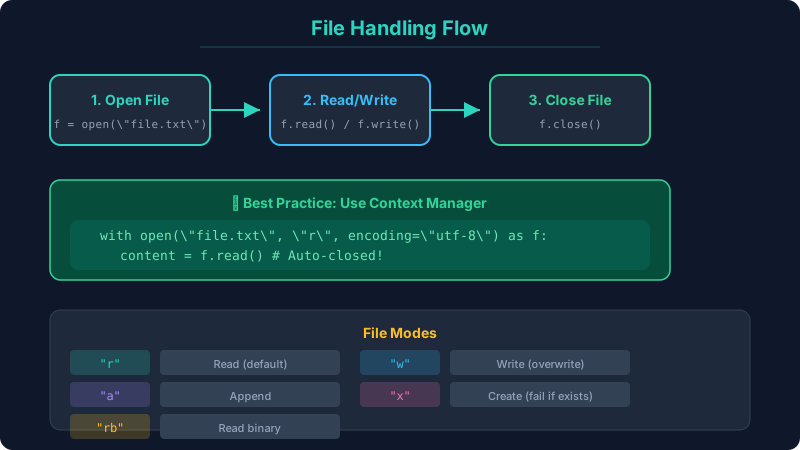
Opening a File
Section titled “Opening a File”file = open("filename.txt", "r") # Open for readingcontent = file.read()file.close() # Always close!File Modes
Section titled “File Modes”| Mode | Description |
|---|---|
"r" | Read (default) |
"w" | Write (overwrites existing) |
"a" | Append (adds to end) |
"x" | Exclusive creation (fails if exists) |
"rb" | Read binary |
"wb" | Write binary |
Reading Files
Section titled “Reading Files”# Method 1: Read all at oncewith open("data.txt", "r") as f: content = f.read()
# Method 2: Read line by line (memory efficient for large files)with open("data.txt", "r") as f: for line in f: print(line.strip())
# Method 3: Read all lines into listwith open("data.txt", "r") as f: lines = f.readlines()
# Method 4: Read specific number of characterswith open("data.txt", "r") as f: chunk = f.read(100) # Read first 100 charsWriting Files
Section titled “Writing Files”# Write (overwrites)with open("output.txt", "w") as f: f.write("Hello, World!\n") f.write("Second line\n")
# Appendwith open("output.txt", "a") as f: f.write("Third line\n")
# Write multiple lineslines = ["Line 1\n", "Line 2\n", "Line 3\n"]with open("output.txt", "w") as f: f.writelines(lines)File Paths
Section titled “File Paths”from pathlib import Path
# Modern approach using pathlibpath = Path("data/notes.txt")content = path.read_text()path.write_text("New content")
# Check file propertiesprint(path.exists()) # True/Falseprint(path.is_file()) # True/Falseprint(path.name) # notes.txtprint(path.stem) # notesprint(path.suffix) # .txtprint(path.parent) # data
# Glob pattern matchingfor py_file in Path("src").glob("**/*.py"): print(py_file)Common Mistakes
Section titled “Common Mistakes”# ❌ Wrong: Not closing filesf = open("data.txt", "r")data = f.read()# File stays open!
# ✅ Correct: Using context managerwith open("data.txt", "r") as f: data = f.read() # Auto-closed
# ❌ Wrong: Encoding issueswith open("data.txt", "r") as f: # Uses system default encoding pass
# ✅ Correct: Explicit encodingwith open("data.txt", "r", encoding="utf-8") as f: passPractice Exercises
Section titled “Practice Exercises”Exercise 1: Write a program that reads a text file and counts the number of words.
Exercise 2: Create a simple note-taking app that saves and loads notes from a file.
Exercise 3: Implement a program that splits a large file into multiple smaller files.