
Layouts and Templates
5. Layouts and Templates
Section titled “5. Layouts and Templates”What is a Layout?
Section titled “What is a Layout?”A layout.tsx file wraps its child pages and persists across navigation. When a user navigates between pages sharing the same layout, the layout component does NOT re-render — only the page content changes.
Analogy: A layout is like the frame of a house. When you walk between rooms (pages), the walls (layout) don’t rebuild — only what’s inside the room changes.
Root Layout (Required)
Section titled “Root Layout (Required)”Every Next.js app must have a root layout at app/layout.tsx. It replaces the old _document.js and _app.js from Pages Router:
import type { Metadata } from 'next';import { Inter } from 'next/font/google';import './globals.css';
// Load the fontconst inter = Inter({ subsets: ['latin'] });
// Page metadata (SEO)export const metadata: Metadata = {  title: 'My App',  description: 'Built with Next.js',};
interface RootLayoutProps {  children: React.ReactNode;}
export default function RootLayout({ children }: RootLayoutProps) {  return (    // Must include <html> and <body>    <html lang="en">      <body className={inter.className}>        <header>Site-wide Header</header>        {children}  {/* Page content renders here */}        <footer>Site-wide Footer</footer>      </body>    </html>  );}
Nested Layouts
Section titled “Nested Layouts”You can nest layouts — each folder can have its own layout.tsx:
app/├── layout.tsx ← Root layout (wraps everything)├── page.tsx└── dashboard/ ├── layout.tsx ← Dashboard layout (wraps dashboard pages) ├── page.tsx └── settings/ └── page.tsximport Sidebar from '@/components/Sidebar';
interface DashboardLayoutProps { children: React.ReactNode;}
export default function DashboardLayout({ children }: DashboardLayoutProps) { return ( <div className="flex h-screen"> <Sidebar /> <main className="flex-1 overflow-auto p-6"> {children} </main> </div> );}When visiting /dashboard/settings, the render order is:
RootLayout └── DashboardLayout └── SettingsPageWhat is a Template?
Section titled “What is a Template?”A template.tsx is similar to a layout but re-renders on every navigation. Each route gets a fresh instance.
'use client';
import { useEffect } from 'react';
export default function DashboardTemplate({  children,}: {  children: React.ReactNode;}) {  // This runs on every navigation within dashboard  useEffect(() => {    console.log('Page changed!');  }, []);
  return <div>{children}</div>;}
Layout vs Template
Section titled “Layout vs Template”| Feature | layout.tsx | template.tsx |
|---|---|---|
| Re-renders on navigation | ❌ No (persists) | ✅ Yes (fresh instance) |
| State preserved | ✅ Yes | ❌ No |
| Effects re-run | ❌ No | ✅ Yes |
| Use case | Sidebar, navbar | Analytics, animations |
| Performance | Better | Slightly worse |
When to use Template:
- Page transition animations (each page enters fresh)
- Analytics pageview tracking (
useEffectmust run per page) - Resetting UI state on navigation
- Enter/exit animations per route
Metadata API
Section titled “Metadata API”Next.js has a built-in Metadata API for managing <head> content:
Static Metadata
Section titled “Static Metadata”import type { Metadata } from 'next';
export const metadata: Metadata = { title: 'About Us | My Company', description: 'Learn about our mission and team.', keywords: ['next.js', 'react', 'web development'], authors: [{ name: 'John Doe', url: 'https://johndoe.com' }], openGraph: { title: 'About Us | My Company', description: 'Learn about our mission and team.', url: 'https://mycompany.com/about', siteName: 'My Company', images: [ { url: 'https://mycompany.com/og-about.jpg', width: 1200, height: 630, alt: 'About My Company', }, ], type: 'website', }, twitter: { card: 'summary_large_image', title: 'About Us | My Company', description: 'Learn about our mission and team.', images: ['https://mycompany.com/og-about.jpg'], },};
export default function AboutPage() { return <div>...</div>;}Dynamic Metadata
Section titled “Dynamic Metadata”import type { Metadata } from 'next';
interface Props { params: Promise<{ slug: string }>;}
// generateMetadata is called before rendering the pageexport async function generateMetadata({ params }: Props): Promise<Metadata> { const { slug } = await params; const post = await getPost(slug);
if (!post) { return { title: 'Post Not Found' }; }
return { title: `${post.title} | My Blog`, description: post.excerpt, openGraph: { title: post.title, description: post.excerpt, images: [{ url: post.coverImage }], type: 'article', publishedTime: post.publishedAt, authors: [post.author.name], }, };}
export default async function BlogPostPage({ params }: Props) { const { slug } = await params; const post = await getPost(slug); return <article>{post.content}</article>;}Title Templates
Section titled “Title Templates”// app/layout.tsx — Define a title templateexport const metadata: Metadata = { title: { template: '%s | My Company', // %s = page-specific title default: 'My Company', // fallback when no title set },};
// app/about/page.tsx — Just set the page titleexport const metadata: Metadata = { title: 'About Us', // Becomes: "About Us | My Company"};Real-World: Dashboard Layout
Section titled “Real-World: Dashboard Layout”// app/(dashboard)/layout.tsximport type { Metadata } from 'next';import Sidebar from '@/components/dashboard/Sidebar';import Header from '@/components/dashboard/Header';import { getSession } from '@/lib/auth';import { redirect } from 'next/navigation';
export const metadata: Metadata = { title: { template: '%s | Dashboard', default: 'Dashboard', },};
export default async function DashboardLayout({ children,}: { children: React.ReactNode;}) { // Server-side auth check const session = await getSession();
if (!session) { redirect('/login'); }
return ( <div className="flex h-screen bg-gray-100"> {/* Sidebar */} <Sidebar user={session.user} />
{/* Main content area */} <div className="flex flex-1 flex-col"> {/* Top header bar */} <Header user={session.user} />
{/* Page content */} <main className="flex-1 overflow-y-auto p-6"> {children} </main> </div> </div> );}Real-World: Authentication Layout
Section titled “Real-World: Authentication Layout”// app/(auth)/layout.tsxexport default function AuthLayout({ children,}: { children: React.ReactNode;}) { return ( <div className="min-h-screen flex"> {/* Decorative left panel */} <div className="hidden lg:flex lg:w-1/2 bg-indigo-600 items-center justify-center"> <div className="text-white text-center"> <h2 className="text-4xl font-bold">Welcome Back</h2> <p className="mt-4 text-indigo-200"> The best platform for your projects. </p> </div> </div>
{/* Form area */} <div className="flex-1 flex items-center justify-center p-8"> {children} </div> </div> );}Nested Dashboard Layout Example
Section titled “Nested Dashboard Layout Example”app/├── layout.tsx ← Root: <html>, <body>├── (marketing)/│ ├── layout.tsx ← Marketing: Navbar + Footer│ └── page.tsx└── (app)/ ├── layout.tsx ← App: Auth check + Dashboard shell └── dashboard/ ├── layout.tsx ← Dashboard: Sidebar ├── page.tsx ├── analytics/ │ ├── layout.tsx ← Analytics: Tab navigation │ └── page.tsx └── settings/ └── page.tsxThe render tree for /dashboard/analytics:
RootLayout └── AppLayout (auth check, sidebar) └── DashboardLayout (sidebar, header) └── AnalyticsLayout (tabs) └── AnalyticsPageSVG: Layout Hierarchy
Section titled “SVG: Layout Hierarchy”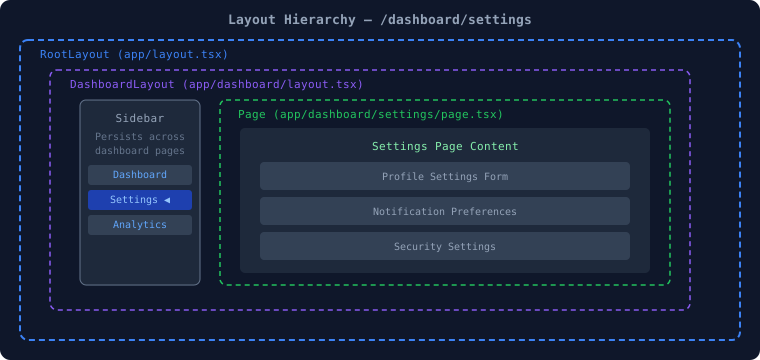
Protected Route Layout Pattern
Section titled “Protected Route Layout Pattern”// app/(protected)/layout.tsximport { redirect } from 'next/navigation';import { getServerSession } from 'next-auth';import { authOptions } from '@/lib/auth';
export default async function ProtectedLayout({ children,}: { children: React.ReactNode;}) { const session = await getServerSession(authOptions);
// Server-side protection — no client-side flicker if (!session) { redirect('/login'); }
return <>{children}</>;}Sidebar Layout with Dynamic Navigation
Section titled “Sidebar Layout with Dynamic Navigation”'use client';
import Link from 'next/link';import { usePathname } from 'next/navigation';import { cn } from '@/utils/cn';
const navItems = [ { href: '/dashboard', label: 'Overview', icon: '📊' }, { href: '/dashboard/analytics', label: 'Analytics', icon: '📈' }, { href: '/dashboard/users', label: 'Users', icon: '👥' }, { href: '/dashboard/settings', label: 'Settings', icon: '⚙️' },];
export default function Sidebar() { const pathname = usePathname();
return ( <aside className="w-64 bg-gray-900 text-white h-screen p-4"> <nav className="space-y-1"> {navItems.map((item) => ( <Link key={item.href} href={item.href} className={cn( 'flex items-center gap-3 px-4 py-2 rounded-lg transition', // Highlight active route pathname === item.href ? 'bg-indigo-600 text-white' : 'text-gray-400 hover:bg-gray-800 hover:text-white' )} > <span>{item.icon}</span> {item.label} </Link> ))} </nav> </aside> );}Common Layout Mistakes ❌
Section titled “Common Layout Mistakes ❌”❌ Putting <html> and <body> in a nested layout (Only the root layout should have these)
❌ Using useState in a layout without 'use client' (Layouts are Server Components by default)
❌ Fetching data in layout AND page separately (Next.js deduplicates fetch(), but still avoid duplication)
❌ Using template.tsx when layout.tsx would work (Template is heavier — use only when re-rendering is needed)
❌ Forgetting that layouts don't receive searchParams (Only pages receive searchParams — layouts do not)
✅ Do auth checks in layouts, not in every page✅ Use the Metadata API instead of manually adding <title> tags✅ Use generateMetadata() for dynamic SEO data✅ Keep the root layout minimal — just globals, font, and metadata📝 Interview Questions — Section 5
Section titled “📝 Interview Questions — Section 5”Beginner:
- What is the difference between
layout.tsxandtemplate.tsx? - Why is the root layout required in Next.js App Router?
- How do you add metadata like title and description in Next.js?
Intermediate: 4. How does nested layout work and in what order do they render? 5. How do you implement protected routes using layouts? 6. What is the Title Template in Next.js Metadata API?
Advanced:
7. How does Next.js deduplicate fetch requests made in both a layout and its child page?
8. Explain how generateMetadata() differs from the static metadata export and when to use each.
9. Describe how you would implement a multi-tenant SaaS app using nested layouts with different branding per tenant.