
Authentication
Section 12: Authentication
Section titled “Section 12: Authentication”What is Authentication?
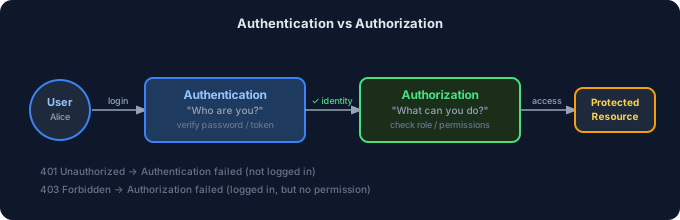
Section titled “What is Authentication?”Authentication answers the question: “Who are you?”
It is the process of verifying a user’s identity before granting them access to a system.
User says: "I am Alice"System asks: "Prove it"User provides: password / fingerprint / tokenSystem checks: ✓ Verified — welcome, Alice!Why it matters:
- Without authentication, anyone could access any user’s data
- Prevents unauthorized access to private resources
- Forms the foundation of every secure web application
Authentication vs Authorization
Section titled “Authentication vs Authorization”These two concepts are often confused but are very different:
| Authentication | Authorization | |
|---|---|---|
| Question | ”Who are you?" | "What can you do?” |
| When | On login | After login, on every request |
| Example | Entering a password | An admin can delete users; a regular user cannot |
| Failure result | 401 Unauthorized | 403 Forbidden |
Session vs JWT vs OAuth
Section titled “Session vs JWT vs OAuth”Session Authentication
Section titled “Session Authentication”A session stores login state on the server. The browser only holds a session ID cookie.
Login:  User sends username + password  Server verifies → creates session in DB  Server sends session ID cookie to browser
Subsequent requests:  Browser sends session ID cookie  Server looks up session ID in DB  Server confirms user is authenticated
Pros: Easy to invalidate (just delete the session), secure by default
Cons: Server must store sessions (memory/DB), harder to scale
JWT (JSON Web Token) Authentication
Section titled “JWT (JSON Web Token) Authentication”A JWT is a self-contained token signed by the server. The server doesn’t store anything.
Login:  User sends username + password  Server verifies → creates signed JWT  Server sends JWT to browser (cookie or localStorage)
Subsequent requests:  Browser sends JWT  Server VERIFIES the signature (no DB lookup needed!)  Server reads user info from the token payload
Pros: Stateless, scales easily, works across services
Cons: Cannot be invalidated before expiry (use short expiry + refresh tokens)
OAuth Authentication
Section titled “OAuth Authentication”OAuth lets users log in with a third-party provider (Google, GitHub, etc.) without sharing their password with your app.
1. User clicks "Sign in with Google"2. Redirect to Google's auth page3. User logs into Google4. Google redirects back with an authorization code5. Your server exchanges code for access token6. Your server fetches user profile from Google7. Create or find user in your DB8. Create your own session/JWTComparison Table
Section titled “Comparison Table”| Feature | Session | JWT | OAuth |
|---|---|---|---|
| Storage | Server DB | Client (cookie/localStorage) | Third-party provider |
| Stateless | No | Yes | Depends |
| Invalidation | Easy | Hard (need blocklist) | Provider handles it |
| Scalability | Harder | Easy | Easy |
| Best for | Simple apps | APIs, microservices | Social login |
| Security | High (server-side) | Medium (must expire fast) | High |
Login, Registration & Password Flows
Section titled “Login, Registration & Password Flows”Login Flow
Section titled “Login Flow”1. User fills login form (email + password)2. POST /api/auth/login3. Server: find user by email in DB4. Server: compare password with bcrypt.compare()5. If match → create JWT or session6. Set HttpOnly cookie with token7. Return 200 + redirect to dashboard8. If no match → return 401 + error messageRegistration Flow
Section titled “Registration Flow”1. User fills registration form (name, email, password)2. POST /api/auth/register3. Server: check if email already exists4. If exists → return 409 Conflict5. Server: hash password with bcrypt.hash(password, 12)6. Server: save user to DB (with HASHED password, never plain)7. Optionally send verification email8. Return 201 CreatedPassword Hashing
Section titled “Password Hashing”NEVER store plain-text passwords. Use bcrypt:
import bcrypt from 'bcryptjs'import { NextRequest, NextResponse } from 'next/server'
export async function POST(request: NextRequest) {  const { email, password, name } = await request.json()
  // Validate inputs  if (!email || !password || password.length < 8) {    return NextResponse.json({ error: 'Invalid input' }, { status: 400 })  }
  // Check if user exists  const existing = await db.user.findUnique({ where: { email } })  if (existing) {    return NextResponse.json({ error: 'Email already in use' }, { status: 409 })  }
  // Hash password — salt rounds of 12 is recommended for production  const hashedPassword = await bcrypt.hash(password, 12)
  // Save user — store the HASH, never the plain password  const user = await db.user.create({    data: { email, name, password: hashedPassword },  })
  return NextResponse.json({ id: user.id, email: user.email }, { status: 201 })}
Cookies, Sessions, Access & Refresh Tokens
Section titled “Cookies, Sessions, Access & Refresh Tokens”Cookies
Section titled “Cookies”Cookies store small pieces of data in the browser, automatically sent with every request:
// Setting a secure HttpOnly cookie in a Next.js API routeimport { cookies } from 'next/headers'
// In a Server Action or Route Handler:const cookieStore = cookies()cookieStore.set('auth-token', token, {  httpOnly: true,        // ← JS cannot read this (XSS protection)  secure: true,          // ← HTTPS only  sameSite: 'lax',       // ← CSRF protection  maxAge: 60 * 60 * 24,  // ← 1 day in seconds  path: '/',})
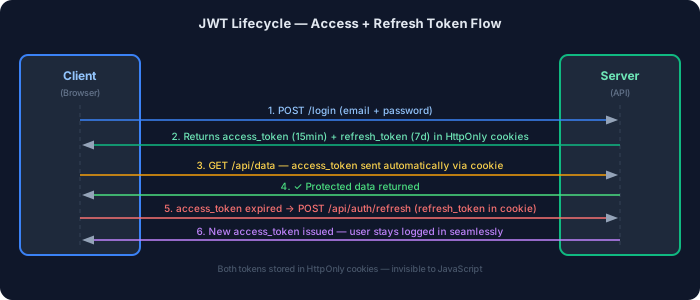
Access Tokens vs Refresh Tokens
Section titled “Access Tokens vs Refresh Tokens”| Access Token | Refresh Token | |
|---|---|---|
| Purpose | Authenticate API requests | Get a new access token |
| Lifetime | Short (15 min – 1 hour) | Long (7 days – 30 days) |
| Storage | Memory or HttpOnly cookie | HttpOnly cookie only |
| Sent with | Every API request | Only to /api/auth/refresh |
Protected Routes & RBAC
Section titled “Protected Routes & RBAC”Protected Routes in App Router
Section titled “Protected Routes in App Router”// app/dashboard/layout.tsx — Protect entire dashboardimport { redirect } from 'next/navigation'import { getServerSession } from 'next-auth'import { authOptions } from '@/lib/auth'
export default async function DashboardLayout({ children,}: { children: React.ReactNode}) { // getServerSession checks the session cookie server-side const session = await getServerSession(authOptions)
// If no session, redirect to login if (!session) { redirect('/login?callbackUrl=/dashboard') }
return ( <div> <nav>Welcome, {session.user?.name}</nav> {children} </div> )}Role-Based Access Control (RBAC)
Section titled “Role-Based Access Control (RBAC)”RBAC restricts pages/features based on the user’s role (e.g., admin, editor, viewer).
// types/next-auth.d.ts — Extend the session type to include roleimport 'next-auth'
declare module 'next-auth' {  interface Session {    user: {      id: string      name?: string | null      email?: string | null      role: 'admin' | 'editor' | 'user'  // ← Add role here    }  }}
// app/admin/page.tsx — Admin only pageimport { redirect } from 'next/navigation'import { getServerSession } from 'next-auth'import { authOptions } from '@/lib/auth'
export default async function AdminPage() { const session = await getServerSession(authOptions)
// Not logged in if (!session) redirect('/login')
// Logged in but not admin if (session.user.role !== 'admin') redirect('/unauthorized')
return ( <div> <h1>Admin Panel</h1> <p>Only admins can see this</p> </div> )}Permissions System
Section titled “Permissions System”For fine-grained control, use a permissions map:
type Role = 'admin' | 'editor' | 'user'type Permission = 'read:posts' | 'write:posts' | 'delete:posts' | 'manage:users'
const ROLE_PERMISSIONS: Record<Role, Permission[]> = {  admin: ['read:posts', 'write:posts', 'delete:posts', 'manage:users'],  editor: ['read:posts', 'write:posts'],  user: ['read:posts'],}
export function hasPermission(role: Role, permission: Permission): boolean {  return ROLE_PERMISSIONS[role]?.includes(permission) ?? false}
// Usage in a component or API route:// if (!hasPermission(session.user.role, 'delete:posts')) throw new Error('Forbidden')
NextAuth.js / Auth.js
Section titled “NextAuth.js / Auth.js”NextAuth.js (rebranded as Auth.js) is the most popular authentication library for Next.js. It handles:
- Multiple providers (Google, GitHub, credentials, etc.)
- Session management
- JWT or database sessions
- CSRF protection
- Callbacks for customizing tokens and sessions
Installation
Section titled “Installation”npm install next-auth# ornpm install next-auth@beta # for Auth.js v5Project Structure
Section titled “Project Structure”my-app/├── app/│ ├── api/│ │ └── auth/│ │ └── [...nextauth]/│ │ └── route.ts ← NextAuth API handler│ ├── login/│ │ └── page.tsx│ └── dashboard/│ └── page.tsx├── lib/│ └── auth.ts ← Auth configuration└── types/ └── next-auth.d.ts ← Type extensionsCredentials, Google & GitHub Providers
Section titled “Credentials, Google & GitHub Providers”auth.ts — Full Configuration
Section titled “auth.ts — Full Configuration”import { NextAuthOptions } from 'next-auth'import CredentialsProvider from 'next-auth/providers/credentials'import GoogleProvider from 'next-auth/providers/google'import GitHubProvider from 'next-auth/providers/github'import { PrismaAdapter } from '@next-auth/prisma-adapter'import { db } from '@/lib/db'import bcrypt from 'bcryptjs'
export const authOptions: NextAuthOptions = { // Use Prisma to persist sessions/users in your DB adapter: PrismaAdapter(db),
// Use JWT for session strategy (good for Edge/serverless) session: { strategy: 'jwt', maxAge: 30 * 24 * 60 * 60, // 30 days },
// Custom pages (optional — override NextAuth defaults) pages: { signIn: '/login', // Custom login page error: '/auth/error', // Auth error page },
// Providers — ways users can log in providers: [ // ─── Credentials (email + password) ────────────────── CredentialsProvider({ name: 'credentials', credentials: { email: { label: 'Email', type: 'email' }, password: { label: 'Password', type: 'password' }, }, async authorize(credentials) { if (!credentials?.email || !credentials?.password) { throw new Error('Invalid credentials') }
// Find user in DB const user = await db.user.findUnique({ where: { email: credentials.email }, })
if (!user || !user.hashedPassword) { throw new Error('User not found') }
// Compare password with hash const isValid = await bcrypt.compare( credentials.password, user.hashedPassword )
if (!isValid) { throw new Error('Invalid password') }
return { id: user.id, email: user.email, name: user.name, role: user.role, } }, }),
// ─── Google OAuth ───────────────────────────────────── GoogleProvider({ clientId: process.env.GOOGLE_CLIENT_ID!, clientSecret: process.env.GOOGLE_CLIENT_SECRET!, }),
// ─── GitHub OAuth ───────────────────────────────────── GitHubProvider({ clientId: process.env.GITHUB_CLIENT_ID!, clientSecret: process.env.GITHUB_CLIENT_SECRET!, }), ],
// Callbacks — customize JWT and session callbacks: { // Runs whenever a JWT is created or updated async jwt({ token, user }) { if (user) { // First login — add extra fields to the token token.id = user.id token.role = (user as any).role } return token },
// Runs whenever a session is checked async session({ session, token }) { if (token) { // Pass JWT fields to the session (available in components) session.user.id = token.id as string session.user.role = token.role as string } return session }, },
// Secret for signing JWTs — use a strong random string secret: process.env.NEXTAUTH_SECRET,}API Route Handler
Section titled “API Route Handler”import NextAuth from 'next-auth'import { authOptions } from '@/lib/auth'
const handler = NextAuth(authOptions)
// Export for both GET and POST (NextAuth uses both)export { handler as GET, handler as POST }Core Auth Functions
Section titled “Core Auth Functions”signIn()
Section titled “signIn()”'use client'
import { signIn } from 'next-auth/react'import { useState } from 'react'import { useRouter } from 'next/navigation'
export default function LoginPage() { const router = useRouter() const [error, setError] = useState('') const [loading, setLoading] = useState(false)
async function handleCredentialsLogin(e: React.FormEvent<HTMLFormElement>) { e.preventDefault() setLoading(true) setError('')
const formData = new FormData(e.currentTarget)
// Sign in with credentials const result = await signIn('credentials', { email: formData.get('email'), password: formData.get('password'), redirect: false, // Handle redirect manually })
setLoading(false)
if (result?.error) { setError('Invalid email or password') return }
// Redirect to dashboard on success router.push('/dashboard') router.refresh() // Refresh server components }
return ( <div className="max-w-md mx-auto mt-20 p-8 border rounded-xl"> <h1 className="text-2xl font-bold mb-6">Sign In</h1>
{/* Credentials form */} <form onSubmit={handleCredentialsLogin} className="space-y-4"> <input name="email" type="email" placeholder="Email" required className="w-full p-3 border rounded-lg" /> <input name="password" type="password" placeholder="Password" required className="w-full p-3 border rounded-lg" /> {error && <p className="text-red-500 text-sm">{error}</p>} <button type="submit" disabled={loading} className="w-full p-3 bg-blue-600 text-white rounded-lg hover:bg-blue-700 disabled:opacity-50" > {loading ? 'Signing in...' : 'Sign In'} </button> </form>
<div className="mt-4 space-y-3"> {/* Google OAuth */} <button onClick={() => signIn('google', { callbackUrl: '/dashboard' })} className="w-full p-3 border rounded-lg flex items-center justify-center gap-2 hover:bg-gray-50" > Sign in with Google </button>
{/* GitHub OAuth */} <button onClick={() => signIn('github', { callbackUrl: '/dashboard' })} className="w-full p-3 border rounded-lg flex items-center justify-center gap-2 hover:bg-gray-100" > Sign in with GitHub </button> </div> </div> )}signOut()
Section titled “signOut()”'use client'
import { signOut } from 'next-auth/react'
export default function LogoutButton() { return ( <button onClick={() => signOut({ callbackUrl: '/login', // Where to redirect after logout }) } className="px-4 py-2 bg-red-600 text-white rounded-lg" > Sign Out </button> )}getServerSession()
Section titled “getServerSession()”Used in Server Components and API Routes to get the current user session:
// app/dashboard/page.tsx — Server Componentimport { getServerSession } from 'next-auth'import { authOptions } from '@/lib/auth'import { redirect } from 'next/navigation'
export default async function DashboardPage() {  // Fetch session on the server — no API call, reads from cookie  const session = await getServerSession(authOptions)
  if (!session) {    redirect('/login')  }
  return (    <div>      <h1>Dashboard</h1>      <p>Welcome, {session.user?.name}!</p>      <p>Email: {session.user?.email}</p>      <p>Role: {session.user?.role}</p>    </div>  )}
// app/api/protected/route.ts — Protected API Routeimport { getServerSession } from 'next-auth'import { authOptions } from '@/lib/auth'import { NextResponse } from 'next/server'
export async function GET() { const session = await getServerSession(authOptions)
if (!session) { return NextResponse.json({ error: 'Unauthorized' }, { status: 401 }) }
return NextResponse.json({ message: 'Protected data', user: session.user, })}Registration Page
Section titled “Registration Page”'use client'
import { useState } from 'react'import { useRouter } from 'next/navigation'import { signIn } from 'next-auth/react'
export default function RegisterPage() { const router = useRouter() const [error, setError] = useState('') const [loading, setLoading] = useState(false)
async function handleRegister(e: React.FormEvent<HTMLFormElement>) { e.preventDefault() setLoading(true) setError('')
const formData = new FormData(e.currentTarget) const data = { name: formData.get('name') as string, email: formData.get('email') as string, password: formData.get('password') as string, }
// Validate password length client-side if (data.password.length < 8) { setError('Password must be at least 8 characters') setLoading(false) return }
// Call registration API const res = await fetch('/api/auth/register', { method: 'POST', headers: { 'Content-Type': 'application/json' }, body: JSON.stringify(data), })
if (!res.ok) { const body = await res.json() setError(body.error ?? 'Registration failed') setLoading(false) return }
// Auto-login after registration await signIn('credentials', { email: data.email, password: data.password, callbackUrl: '/dashboard', }) }
return ( <div className="max-w-md mx-auto mt-20 p-8 border rounded-xl"> <h1 className="text-2xl font-bold mb-6">Create Account</h1> <form onSubmit={handleRegister} className="space-y-4"> <input name="name" type="text" placeholder="Full Name" required className="w-full p-3 border rounded-lg"/> <input name="email" type="email" placeholder="Email" required className="w-full p-3 border rounded-lg"/> <input name="password" type="password" placeholder="Password (min. 8 chars)" required className="w-full p-3 border rounded-lg"/> {error && <p className="text-red-500 text-sm">{error}</p>} <button type="submit" disabled={loading} className="w-full p-3 bg-blue-600 text-white rounded-lg disabled:opacity-50"> {loading ? 'Creating account...' : 'Create Account'} </button> </form> </div> )}Protected Dashboard with Role Display
Section titled “Protected Dashboard with Role Display”import { getServerSession } from 'next-auth'import { authOptions } from '@/lib/auth'import { redirect } from 'next/navigation'import LogoutButton from '@/components/LogoutButton'
export default async function Dashboard() { const session = await getServerSession(authOptions) if (!session) redirect('/login')
return ( <div className="max-w-2xl mx-auto mt-10 p-8"> <div className="flex justify-between items-center mb-6"> <h1 className="text-3xl font-bold">Dashboard</h1> <LogoutButton /> </div>
<div className="bg-white border rounded-xl p-6 space-y-3"> <p><span className="font-semibold">Name:</span> {session.user?.name}</p> <p><span className="font-semibold">Email:</span> {session.user?.email}</p> <p> <span className="font-semibold">Role:</span>{' '} <span className={`px-2 py-1 rounded text-sm ${ session.user?.role === 'admin' ? 'bg-red-100 text-red-700' : 'bg-green-100 text-green-700' }`}> {session.user?.role ?? 'user'} </span> </p> </div>
{/* Admin-only section */} {session.user?.role === 'admin' && ( <div className="mt-6 bg-red-50 border border-red-200 rounded-xl p-6"> <h2 className="font-bold text-red-700 mb-2">Admin Panel</h2> <p className="text-sm text-red-600">This section is only visible to admins.</p> </div> )} </div> )}OAuth Flow Diagram
Section titled “OAuth Flow Diagram”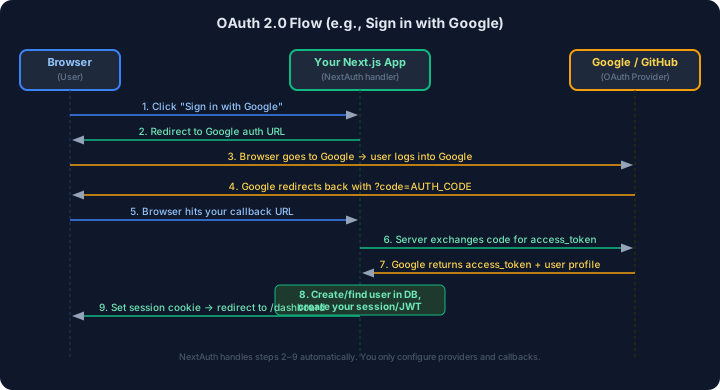
Password Security & Secure Cookies
Section titled “Password Security & Secure Cookies”Password Security Best Practices
Section titled “Password Security Best Practices”// ─── Password hashing with bcrypt ───────────────────────import bcrypt from 'bcryptjs'
// Hashing — always use cost factor 12 or higher in productionconst SALT_ROUNDS = 12const hash = await bcrypt.hash('userPassword123', SALT_ROUNDS)
// Comparing — timing-safe, returns booleanconst isMatch = await bcrypt.compare('userPassword123', hash)
// ─── NEVER DO THESE ─────────────────────────────────────// ❌ Store plain text passwords// ❌ Use MD5 or SHA1 for passwords (not designed for passwords)// ❌ Use a fast hash like SHA256 (too fast = easy to brute force)// ❌ Use bcrypt cost factor < 10 in productionSecure Cookie Configuration
Section titled “Secure Cookie Configuration”// Setting a production-safe auth cookieimport { cookies } from 'next/headers'
function setAuthCookie(token: string) { const cookieStore = cookies()
cookieStore.set('auth-token', token, { httpOnly: true, // JS can't read it (stops XSS) secure: process.env.NODE_ENV === 'production', // HTTPS only in prod sameSite: 'lax', // Prevents CSRF on cross-site requests maxAge: 60 * 60 * 24 * 7, // 7 days path: '/', // Available to all routes })}| Cookie Attribute | Purpose | Recommended Value |
|---|---|---|
httpOnly | Prevents JS from reading the cookie | true |
secure | HTTPS only | true in production |
sameSite | CSRF protection | lax (or strict for maximum security) |
maxAge | Expiry in seconds | 7 days for refresh, 15 min for access |
path | Which routes send the cookie | / |
CSRF Basics
Section titled “CSRF Basics”CSRF (Cross-Site Request Forgery) is an attack where a malicious website tricks your browser into making a request to your app while you’re logged in.
Attack flow without protection: 1. You're logged into bank.com 2. You visit evil.com 3. evil.com has a hidden form that posts to bank.com/transfer 4. Your browser sends the request WITH your bank.com cookie 5. Bank thinks it's you!Defenses:
sameSite: 'lax'on cookies — browser won’t send cookie on cross-site POST- CSRF tokens — server generates a unique token, client must send it in the form
- NextAuth.js handles CSRF protection automatically (it generates a CSRF token for every sign-in)
// NextAuth's built-in CSRF token (used automatically by its sign-in forms)// GET /api/auth/csrf → returns { csrfToken: "..." }// You can read it to build custom forms:import { getCsrfToken } from 'next-auth/react'const csrfToken = await getCsrfToken()Authentication Workflow Diagram
Section titled “Authentication Workflow Diagram”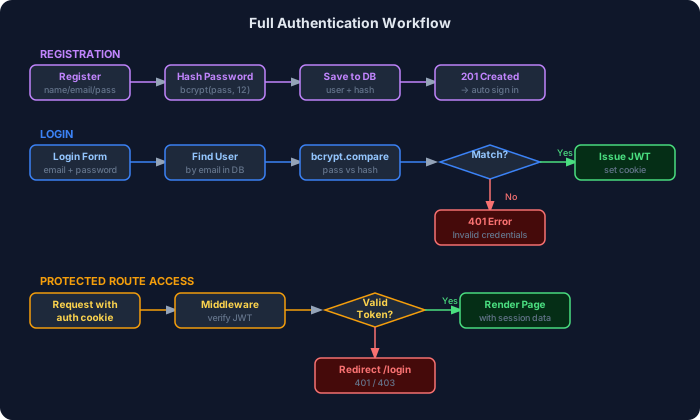
Best Practices — Authentication
Section titled “Best Practices — Authentication”- Always hash passwords with
bcrypt(cost factor 12+). Never store plain text. - Use short-lived access tokens (15–60 minutes) and refresh them silently.
- Store tokens in HttpOnly cookies, not
localStorage(XSS protection). - Use
sameSite: 'lax'on auth cookies for CSRF protection. - Validate sessions server-side on protected routes — never trust client-side state alone.
- Implement rate limiting on login endpoints to prevent brute-force attacks.
- Send verification emails for new accounts before allowing access.
- Use HTTPS in production — auth tokens are useless if intercepted in plain text.
- Never log passwords or tokens — scrub them from logs.
- Extend NextAuth session types to include
roleandid— don’t cast asanyeverywhere. - Use
redirect: falseinsignIn()to handle errors client-side. - Always call
router.refresh()after sign-in to update Server Components with the new session.
Common Mistakes — Authentication
Section titled “Common Mistakes — Authentication”- Storing JWT in localStorage — vulnerable to XSS. Use HttpOnly cookies.
- Not verifying the JWT on the server — only checking the cookie name, not the signature.
- Long-lived access tokens — if stolen, attacker has access for a long time. Use 15-minute tokens.
- Not extending the NextAuth session type —
session.user.roleshows a TypeScript error or is typed asany. - Forgetting
NEXTAUTH_SECRETin environment variables — NextAuth silently falls back to a weak secret. - Fetching session with
useSession()in Server Components — usegetServerSession()instead. - Not wrapping the app in
SessionProvider—useSession()fails in client components. - Not calling
router.refresh()after sign-in — Server Components still show the logged-out state. - Checking auth only in middleware — still double-check in the page/API route (defense in depth).
- Sending passwords over HTTP — always require HTTPS in production.
Interview Questions — Authentication
Section titled “Interview Questions — Authentication”Beginner:
- What is the difference between authentication and authorization?
- Why should passwords never be stored in plain text?
- What is a JWT and what does it contain?
- What is an HttpOnly cookie, and why is it more secure than localStorage?
Intermediate:
5. How does OAuth work? Walk through the flow step by step.
6. What is the difference between access tokens and refresh tokens?
7. How do you protect a page in the Next.js App Router?
8. What is getServerSession() and when would you use it?
9. What is CSRF, and how does sameSite: 'lax' help prevent it?
10. How would you implement role-based access control in Next.js?
Advanced: 11. How do you implement silent token refresh without interrupting the user experience? 12. What are the security tradeoffs between session-based and JWT-based authentication? 13. How does NextAuth.js handle CSRF protection internally? 14. What is token rotation, and why is it important for refresh tokens? 15. How would you securely implement “remember me” functionality?