
Data Fetching
Section 8: Data Fetching
Section titled “Section 8: Data Fetching”8.1 What is Data Fetching?
Section titled “8.1 What is Data Fetching?”Data fetching is how your application gets data — from your own server, a database, or a third-party API. Next.js offers multiple strategies depending on your needs.
Analogy: Think of a restaurant. Some items are pre-made (static), some are cooked fresh (dynamic), and some are prepared ahead and refreshed regularly (incremental).
8.2 Client-Side vs Server-Side Fetching
Section titled “8.2 Client-Side vs Server-Side Fetching”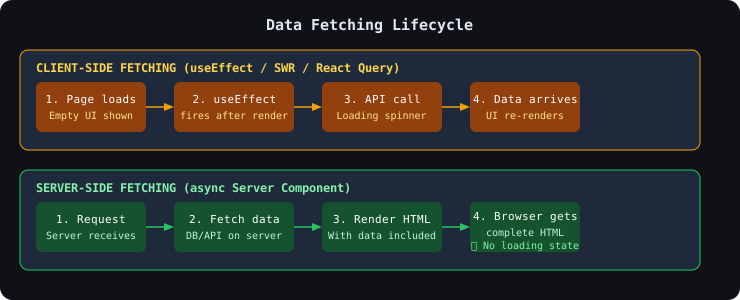
8.3 The fetch API in Next.js
Section titled “8.3 The fetch API in Next.js”Next.js extends the native fetch with caching options.
Static Fetch (Cached Forever)
Section titled “Static Fetch (Cached Forever)”// Cached at build time — only fetches onceasync function getProducts() { const res = await fetch("https://api.example.com/products", { cache: "force-cache", // Default behavior });
if (!res.ok) throw new Error("Failed to fetch products"); return res.json();}Dynamic Fetch (No Cache)
Section titled “Dynamic Fetch (No Cache)”// Fresh data on every requestasync function getLiveStockPrice(symbol: string) { const res = await fetch(`https://api.example.com/stock/${symbol}`, { cache: "no-store", // Never cache — always fresh }); return res.json();}Revalidated Fetch (ISR-style)
Section titled “Revalidated Fetch (ISR-style)”// Refresh every 60 secondsasync function getNews() { const res = await fetch("https://api.example.com/news", { next: { revalidate: 60 }, // Revalidate every 60 seconds }); return res.json();}8.4 Async Server Components
Section titled “8.4 Async Server Components”interface Post { id: number; title: string; body: string; userId: number;}
// This entire component runs on the serverasync function BlogPage() { // Parallel fetching — much faster than sequential const [posts, categories] = await Promise.all([ fetch("https://jsonplaceholder.typicode.com/posts").then((r) => r.json()), fetch("https://jsonplaceholder.typicode.com/users").then((r) => r.json()), ]);
return ( <div> <h1>Blog Posts ({posts.length})</h1> <ul> {posts.slice(0, 5).map((post: Post) => ( <li key={post.id}> <h2>{post.title}</h2> <p>{post.body.substring(0, 100)}...</p> </li> ))} </ul> </div> );}
export default BlogPage;📖 Streaming & Suspense is covered in detail on the dedicated page →
8.5 Suspense and Streaming
Section titled “8.5 Suspense and Streaming”Suspense lets you show a loading placeholder while a component is fetching data. Streaming sends parts of the page as they’re ready — users see content faster.
import { Suspense } from "react";
// Each section loads independentlyexport default function DashboardPage() {  return (    <div>      <h1>Dashboard</h1>
      {/* Shows skeleton while StatsSection loads */}      <Suspense fallback={<StatsSkeleton />}>        <StatsSection />      </Suspense>
      {/* Shows skeleton while RecentOrders loads */}      <Suspense fallback={<OrdersSkeleton />}>        <RecentOrders />      </Suspense>    </div>  );}
// Loading skeletonfunction StatsSkeleton() {  return (    <div className="grid grid-cols-3 gap-4 animate-pulse">      {[1, 2, 3].map((i) => (        <div key={i} className="h-24 bg-gray-200 rounded-xl" />      ))}    </div>  );}
// These are async Server Componentsasync function StatsSection() {  const stats = await fetchStats(); // Slow DB query  return <StatsGrid data={stats} />;}
async function RecentOrders() {  const orders = await fetchRecentOrders();  return <OrdersTable data={orders} />;}
📖 Caching & Revalidation is covered in detail on the dedicated page →
8.6 Caching and Revalidation
Section titled “8.6 Caching and Revalidation”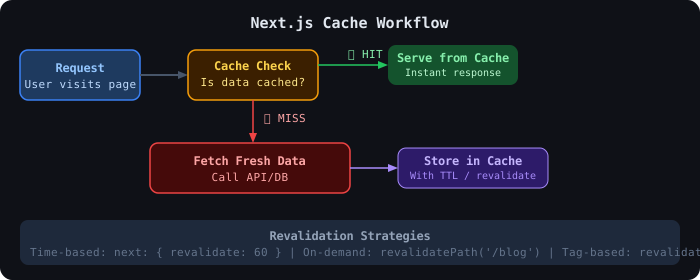
On-Demand Revalidation
Section titled “On-Demand Revalidation”import { revalidatePath, revalidateTag } from "next/cache";import { NextRequest, NextResponse } from "next/server";
export async function POST(request: NextRequest) { const { path, tag, secret } = await request.json();
// Validate secret to prevent abuse if (secret !== process.env.REVALIDATION_SECRET) { return NextResponse.json({ error: "Unauthorized" }, { status: 401 }); }
if (path) { revalidatePath(path); // Revalidate a specific page }
if (tag) { revalidateTag(tag); // Revalidate all fetches with this tag }
return NextResponse.json({ revalidated: true, timestamp: Date.now() });}8.7 Error Handling in Data Fetching
Section titled “8.7 Error Handling in Data Fetching”async function ProductsPage() { let products = []; let error = null;
try { const res = await fetch("https://api.example.com/products");
if (!res.ok) { throw new Error(`HTTP error! status: ${res.status}`); }
products = await res.json(); } catch (err) { error = err instanceof Error ? err.message : "Unknown error"; }
if (error) { return ( <div className="error-state"> <h2>Something went wrong</h2> <p>{error}</p> </div> ); }
return ( <ul> {products.map((p) => ( <li key={p.id}>{p.name}</li> ))} </ul> );}Or use Next.js error.tsx for automatic error boundaries:
"use client"; // Error components must be Client Components
interface ErrorProps {  error: Error & { digest?: string };  reset: () => void;}
export default function Error({ error, reset }: ErrorProps) {  return (    <div className="flex flex-col items-center py-20">      <h2 className="text-xl font-bold text-red-600">Something went wrong!</h2>      <p className="text-gray-600 mt-2">{error.message}</p>      <button        onClick={reset}        className="mt-4 px-4 py-2 bg-blue-600 text-white rounded-lg"      >        Try Again      </button>    </div>  );}
8.8 Client-Side Fetching with React Query
Section titled “8.8 Client-Side Fetching with React Query”For complex client-side scenarios, React Query (TanStack Query) is the industry standard:
"use client";
import { QueryClient, QueryClientProvider } from "@tanstack/react-query";import { useState } from "react";
export function Providers({ children }: { children: React.ReactNode }) { const [queryClient] = useState(() => new QueryClient()); return ( <QueryClientProvider client={queryClient}>{children}</QueryClientProvider> );}"use client";
import { useQuery } from "@tanstack/react-query";
async function fetchUser(id: string) { const res = await fetch(`/api/users/${id}`); if (!res.ok) throw new Error("Failed to fetch user"); return res.json();}
export function UserProfile({ userId }: { userId: string }) { const { data: user, isLoading, error } = useQuery({ queryKey: ["user", userId], queryFn: () => fetchUser(userId), staleTime: 5 * 60 * 1000, // 5 minutes });
if (isLoading) return <div className="skeleton h-20" />; if (error) return <p className="text-red-500">Error loading user</p>;
return <div>{user.name}</div>;}8.9 Data Fetching Comparison Tables
Section titled “8.9 Data Fetching Comparison Tables”Client vs Server Fetching
Section titled “Client vs Server Fetching”| Aspect | Client-Side Fetching | Server-Side Fetching |
|---|---|---|
| When data loads | After component mounts | Before page sends to browser |
| Loading state needed | ✅ Yes | ❌ No (data is ready) |
| SEO | ❌ Content not in HTML | ✅ Content in HTML |
| API keys exposure | ⚠️ Risky in browser | ✅ Safe on server |
| Real-time updates | ✅ Easy with polling/WS | ❌ Requires revalidation |
| User-specific data | ✅ Ideal | ✅ Also possible |
| Bundle size | Adds fetch code | No impact |
Cache Strategies
Section titled “Cache Strategies”| Strategy | Config | When to Use |
|---|---|---|
| Static (cached forever) | cache: "force-cache" | Marketing pages, docs |
| Time-based revalidation | next: { revalidate: 60 } | News, prices, feeds |
| No cache (always fresh) | cache: "no-store" | User data, auth pages |
| Tag-based revalidation | next: { tags: ["posts"] } | CMS-driven content |
8.10 Interview Questions — Data Fetching
Section titled “8.10 Interview Questions — Data Fetching”- What is the difference between
cache: "force-cache"andcache: "no-store"? - How does
next: { revalidate: 60 }work? - What is
Suspenseand how does it improve UX? - What is streaming in Next.js? How does it differ from traditional rendering?
- When would you use client-side fetching over server-side fetching?
- What is
revalidatePath? When is it useful? - How do you handle errors in server component data fetching?
- What is the waterfall problem in data fetching? How do you fix it?
- What is
Promise.alland why is it important for performance? - What is React Query and when should you prefer it over
fetch?