
Error Handling
Section 18: Error Handling
Section titled “Section 18: Error Handling”18.1 What Is Error Handling?
Section titled “18.1 What Is Error Handling?”Error handling is the process of anticipating, detecting, and gracefully recovering from problems that occur during application execution. In Next.js, errors can happen at different layers — during rendering, data fetching, API calls, or build time — and each layer needs a distinct strategy.
Simple analogy: Think of error handling like a safety net under a tightrope walker. The goal is to never fall, but when you do, the net catches you and prevents disaster.
18.2 Why Error Handling Matters
Section titled “18.2 Why Error Handling Matters”| Reason | Without Error Handling | With Error Handling |
|---|---|---|
| User Experience | White screen, cryptic messages | Friendly fallback UI |
| Debugging | Silent failures, no logs | Structured error logs |
| SEO | 500 errors hurt ranking | Graceful 404/redirect |
| Security | Stack traces leaked to users | Sanitized messages |
| Reliability | Entire app crashes | Isolated failure zones |
18.3 Types of Errors in Next.js
Section titled “18.3 Types of Errors in Next.js”Runtime Errors
Section titled “Runtime Errors”Occur while the app is running — unexpected null values, failed network requests, unhandled promise rejections.
Build Errors
Section titled “Build Errors”Occur during next build — TypeScript type errors, missing imports, syntax errors.
API Errors
Section titled “API Errors”Occur inside Route Handlers — database failures, third-party API timeouts, invalid payloads.
18.4 Error Lifecycle Diagram
Section titled “18.4 Error Lifecycle Diagram”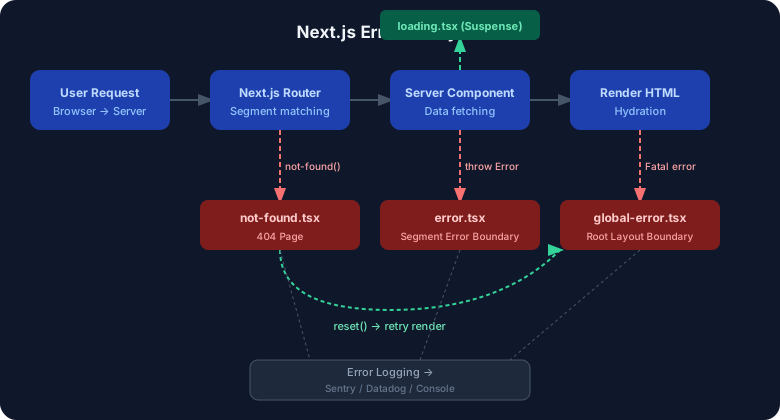
18.5 Special Files for Error Handling
Section titled “18.5 Special Files for Error Handling”Next.js App Router introduces convention-based error files. Place them inside any route segment folder.
| File | Purpose | Scope |
|---|---|---|
error.tsx | Catches runtime errors in a segment | Segment-level |
global-error.tsx | Catches root layout errors | Entire app |
not-found.tsx | Renders 404 UI | Segment or global |
loading.tsx | Shows skeleton while data loads | Segment-level |
error.tsx — Segment Error Boundary
Section titled “error.tsx — Segment Error Boundary”'use client'; // REQUIRED — error boundaries must be Client Components
import { useEffect } from 'react';
interface ErrorProps { error: Error & { digest?: string }; reset: () => void;}
export default function DashboardError({ error, reset }: ErrorProps) { useEffect(() => { // Log to external service (e.g., Sentry) console.error('[Dashboard Error]', error); }, [error]);
return ( <div className="flex flex-col items-center justify-center min-h-[400px] p-8"> <div className="bg-red-50 border border-red-200 rounded-xl p-6 max-w-md w-full text-center"> <h2 className="text-xl font-bold text-red-700 mb-2"> Something went wrong! </h2> <p className="text-red-600 text-sm mb-4"> {error.message || 'An unexpected error occurred.'} </p> {error.digest && ( <p className="text-xs text-gray-400 mb-4"> Error ID: {error.digest} </p> )} <button onClick={reset} className="px-4 py-2 bg-red-600 text-white rounded-lg hover:bg-red-700 transition" > Try Again </button> </div> </div> );}Key points about error.tsx:
- Must be a Client Component (
'use client') - Receives
error(the Error object) andreset(a function to re-render the segment) - The
digestproperty is a hashed server-side error identifier — safe to show users - Does not catch errors thrown in the same segment’s
layout.tsx
global-error.tsx — Root Error Boundary
Section titled “global-error.tsx — Root Error Boundary”'use client';
interface GlobalErrorProps { error: Error & { digest?: string }; reset: () => void;}
export default function GlobalError({ error, reset }: GlobalErrorProps) { return ( // Must include <html> and <body> — replaces the root layout on error <html lang="en"> <body> <div style={{ display: 'flex', alignItems: 'center', justifyContent: 'center', height: '100vh', fontFamily: 'system-ui, sans-serif', background: '#0f172a', color: '#f1f5f9', }}> <div style={{ textAlign: 'center' }}> <h1 style={{ fontSize: '2rem', marginBottom: '0.5rem' }}> ⚠️ Critical Error </h1> <p style={{ color: '#94a3b8', marginBottom: '1rem' }}> The application encountered a fatal error. </p> <button onClick={reset} style={{ padding: '0.5rem 1.5rem', background: '#ef4444', color: 'white', border: 'none', borderRadius: '8px', cursor: 'pointer', }} > Reload Application </button> </div> </div> </body> </html> );}⚠️
global-error.tsxmust include full<html>and<body>tags because it completely replaces the root layout when triggered.
not-found.tsx — 404 Handler
Section titled “not-found.tsx — 404 Handler”// app/not-found.tsx (global)// OR app/blog/not-found.tsx (segment-specific)import Link from 'next/link';
export default function NotFound() { return ( <div className="min-h-screen flex flex-col items-center justify-center gap-4"> <h1 className="text-6xl font-black text-gray-200">404</h1> <h2 className="text-2xl font-bold text-gray-700">Page Not Found</h2> <p className="text-gray-500"> The page you are looking for does not exist. </p> <Link href="/" className="px-6 py-3 bg-blue-600 text-white rounded-lg hover:bg-blue-700" > Go Home </Link> </div> );}Triggering notFound() programmatically:
import { notFound } from 'next/navigation';
interface Props {  params: { slug: string };}
async function getPost(slug: string) {  const res = await fetch(`https://api.example.com/posts/${slug}`);  if (!res.ok) return null;  return res.json();}
export default async function BlogPost({ params }: Props) {  const post = await getPost(params.slug);
  // Triggers not-found.tsx automatically  if (!post) {    notFound();  }
  return (    <article>      <h1>{post.title}</h1>      <p>{post.content}</p>    </article>  );}
loading.tsx — Suspense Wrapper
Section titled “loading.tsx — Suspense Wrapper”export default function DashboardLoading() { return ( <div className="p-6 space-y-4"> {/* Skeleton loaders */} <div className="h-8 bg-gray-200 rounded animate-pulse w-48" /> <div className="grid grid-cols-3 gap-4"> {[1, 2, 3].map((i) => ( <div key={i} className="h-32 bg-gray-200 rounded-xl animate-pulse" /> ))} </div> <div className="h-64 bg-gray-200 rounded-xl animate-pulse" /> </div> );}Next.js automatically wraps the page in <Suspense> using loading.tsx as the fallback.
18.6 Error Boundary Workflow Diagram
Section titled “18.6 Error Boundary Workflow Diagram”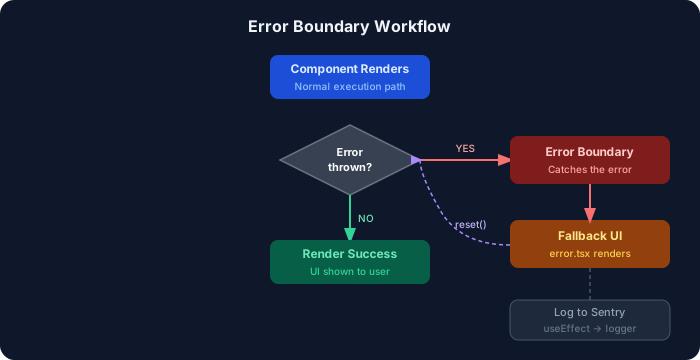
18.7 API Error Handling in Route Handlers
Section titled “18.7 API Error Handling in Route Handlers”import { NextRequest, NextResponse } from 'next/server';import { z } from 'zod';
// Input validation schemaconst CreateUserSchema = z.object({ name: z.string().min(2).max(50), email: z.string().email(),});
export async function POST(request: NextRequest) { try { const body = await request.json();
// Validate input const parsed = CreateUserSchema.safeParse(body); if (!parsed.success) { return NextResponse.json( { error: 'Invalid input', details: parsed.error.flatten() }, { status: 400 } ); }
// Simulate DB call const user = await createUser(parsed.data);
return NextResponse.json({ user }, { status: 201 });
} catch (error) { if (error instanceof DatabaseError) { return NextResponse.json( { error: 'Database unavailable' }, { status: 503 } ); }
console.error('[POST /api/users]', error); return NextResponse.json( { error: 'Internal Server Error' }, { status: 500 } ); }}18.8 Request Failure Flow Diagram
Section titled “18.8 Request Failure Flow Diagram”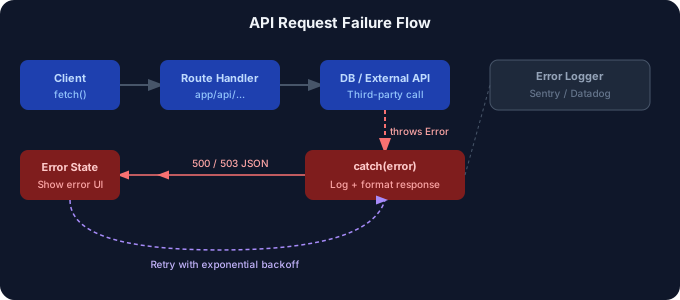
18.9 Error Logging
Section titled “18.9 Error Logging”Integrate error logging with external services to monitor production errors:
import * as Sentry from '@sentry/nextjs';
export function logError(error: Error, context?: Record<string, unknown>) {  // Log to console in development  if (process.env.NODE_ENV === 'development') {    console.error('[Error]', error.message, context);    return;  }
  // Capture in Sentry in production  Sentry.withScope((scope) => {    if (context) {      scope.setExtras(context);    }    Sentry.captureException(error);  });}
// Usage in error.tsxuseEffect(() => { logError(error, { component: 'DashboardPage', userId: session?.user?.id, digest: error.digest, });}, [error]);18.10 Best Practices for Error Handling
Section titled “18.10 Best Practices for Error Handling”- ✅ Always add
error.tsxto data-fetching route segments - ✅ Use
notFound()instead of returning null for missing resources - ✅ Show the
error.digestfor support purposes — never raw stack traces - ✅ Log errors server-side using
useEffectin error boundaries - ✅ Provide actionable fallback UI (retry button, go home link)
- ✅ Validate all API inputs with Zod or similar before processing
- ✅ Use HTTP status codes correctly in route handlers (400, 401, 404, 500)
- ✅ Test error boundaries explicitly in your test suite
18.11 Common Mistakes
Section titled “18.11 Common Mistakes”| Mistake | Problem | Fix |
|---|---|---|
Forgetting 'use client' in error.tsx | Build error | Always add 'use client' |
| Catching errors silently | No logs, hard to debug | Always log before swallowing |
| Leaking stack traces | Security risk | Show generic message, log internally |
| Not handling loading state | Jarring UX | Always add loading.tsx |
Missing global-error.tsx | Root layout errors unhandled | Create it at app/global-error.tsx |
| Using try/catch without re-throwing | Error boundaries never fire | Let unexpected errors propagate |
18.12 Interview Questions — Error Handling
Section titled “18.12 Interview Questions — Error Handling”Beginner:
- What is the difference between
error.tsxandglobal-error.tsx? - Why must
error.tsxbe a Client Component? - How do you programmatically trigger a 404 page in Next.js?
Intermediate:
4. What does the reset() function do in an error boundary?
5. How does loading.tsx relate to React Suspense?
6. How would you integrate Sentry for error tracking in a Next.js App Router project?
Advanced:
7. How does error boundary scoping work across nested layouts in the App Router?
8. What is the digest property on an error object, and why is it useful?
9. How would you implement retry logic with exponential backoff for failed API requests?