
Basic Types in TypeScript
Basic Types in TypeScript
Section titled “Basic Types in TypeScript”Overview
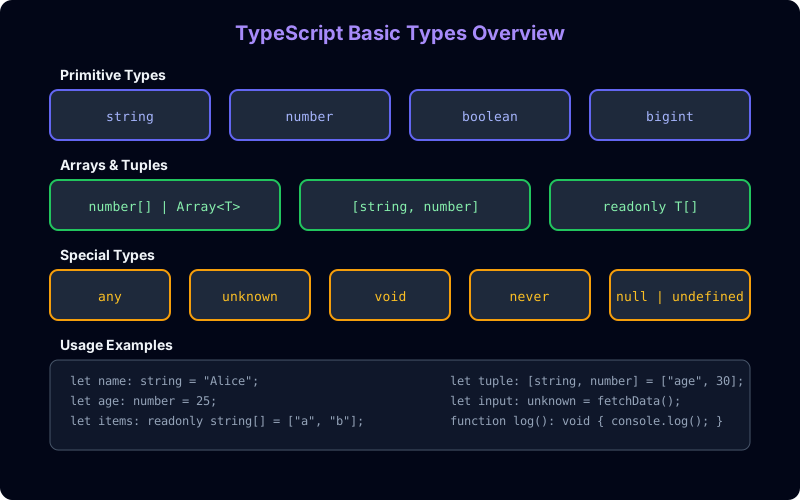
Section titled “Overview”TypeScript provides a rich set of basic types that extend JavaScript’s primitives with static type checking.
Primitive Types
Section titled “Primitive Types”// Stringlet name: string = "Alice";let greeting: string = `Hello, ${name}!`; // Template literals worklet multiLine: string = ` This is a multi-line string`;
// Number (all JS numbers are floating-point)let age: number = 25;let price: number = 19.99;let hex: number = 0xFF; // 255let binary: number = 0b1010; // 10let octal: number = 0o744; // 484
// Booleanlet isActive: boolean = true;let isComplete: boolean = false;Type Inference
Section titled “Type Inference”TypeScript can infer types automatically. You don’t always need to annotate:
// TypeScript infers these types:let name = "Alice";           // stringlet age = 25;                 // numberlet isActive = true;          // boolean
// Hover over these variables in VS Code to see the inferred types
Special Types
Section titled “Special Types”// any — opt-out of type checking (avoid when possible)let loose: any = 42;loose = "Hello"; // OKloose = true; // OKloose.toUpperCase(); // Runtime error! No compile-time check
// unknown — type-safe alternative to anylet value: unknown = 42;value = "Hello"; // OK// value.toUpperCase(); // ❌ Error: Object is of type 'unknown'if (typeof value === "string") { value.toUpperCase(); // OK — narrowed with typeof check}
// void — absence of a value (typically for function returns)function log(message: string): void { console.log(message);}
// never — never occurs (for functions that throw or infinite loops)function throwError(message: string): never { throw new Error(message);}function infiniteLoop(): never { while (true) {}}
// null and undefinedlet nothing: null = null;let notDefined: undefined = undefined;Arrays
Section titled “Arrays”// Two syntaxes — both are equivalentlet numbers: number[] = [1, 2, 3];let names: Array<string> = ["Alice", "Bob", "Charlie"];
// Multi-dimensional arrayslet matrix: number[][] = [ [1, 2], [3, 4],];
// Readonly arraylet readonlyNames: readonly string[] = ["Alice", "Bob"];// readonlyNames.push("Charlie"); // ❌ Error: Property 'push' does not exist on type 'readonly string[]'
// Mixed types with unionlet mixed: (string | number)[] = ["Hello", 42, "World", 100];Special Number Types
Section titled “Special Number Types”// BigInt — for arbitrarily large integerslet big: bigint = 100n;let anotherBig = BigInt("9007199254740991");
// Type assertions for numberslet value: unknown = "3.14";let parsed = Number(value); // numberlet parsedStrict = parseFloat(value); // numberSymbol Type
Section titled “Symbol Type”// Symbols — unique identifiersconst sym1: symbol = Symbol("key");const sym2: symbol = Symbol("key");console.log(sym1 === sym2); // false — symbols are always unique
// Well-known symbolsconst iterable = { [Symbol.iterator]: function* () { yield 1; yield 2; }};Real Project Example
Section titled “Real Project Example”// User management system typestype UserId = string;type Email = string;type Age = number;type IsVerified = boolean;
interface User { id: UserId; name: string; email: Email; age?: Age; // Optional property isVerified: IsVerified; createdAt: Date; tags: string[]; // Array type metadata: unknown; // Flexible but type-safe}
function createUser(name: string, email: string): User { return { id: crypto.randomUUID(), name, email, age: undefined, // Optional — can be omitted isVerified: false, createdAt: new Date(), tags: [], metadata: {}, };}Common Mistakes
Section titled “Common Mistakes”| Mistake | Why It’s Wrong | Fix |
|---|---|---|
Using any for everything | Disables all type checking | Use unknown + type guards |
Forgetting undefined in optional params | Optional params are Type | undefined | Use param?: type syntax |
Not using readonly for arrays | Accidental mutation | Use readonly T[] or ReadonlyArray<T> |
Using Number instead of number | Number is the object wrapper type | Always use lowercase number |
Interview Questions
Section titled “Interview Questions”Easy: What are the basic types in TypeScript?
Medium: Explain the difference between any and unknown. When would you use each?
Hard: Why does TypeScript have both null and undefined? How does strictNullChecks affect their behavior?