
Routing in Next.js
4. Routing in Next.js
Section titled “4. Routing in Next.js”How File-Based Routing Works
Section titled “How File-Based Routing Works”Next.js App Router uses the file system as the router. Every folder inside app/ that contains a page.tsx file becomes a route.
app/├── page.tsx → /├── about/│ └── page.tsx → /about├── blog/│ ├── page.tsx → /blog│ └── post/│ └── page.tsx → /blog/postAnalogy: Think of your
app/folder as a filing cabinet. Each drawer (folder) is a URL segment, and thepage.tsxinside is the actual page.
Route File Conventions
Section titled “Route File Conventions”| File | Purpose | URL |
|---|---|---|
page.tsx | The page UI | /route |
layout.tsx | Shared UI wrapper | Wraps children |
loading.tsx | Loading skeleton | Shows while page loads |
error.tsx | Error boundary | Shows on error |
not-found.tsx | 404 page | When route not found |
route.ts | API endpoint | REST API handler |
template.tsx | Re-renders on nav | Like layout, but fresh each time |
default.tsx | Fallback for parallel routes | Default slot content |
Basic Routes
Section titled “Basic Routes”// app/page.tsx — renders at /export default function HomePage() { return <h1>Welcome Home</h1>;}
// app/about/page.tsx — renders at /aboutexport default function AboutPage() { return <h1>About Us</h1>;}
// app/blog/page.tsx — renders at /blogexport default function BlogPage() { return <h1>Blog</h1>;}Nested Routes
Section titled “Nested Routes”app/└── dashboard/ ├── page.tsx → /dashboard ├── analytics/ │ └── page.tsx → /dashboard/analytics └── settings/ └── page.tsx → /dashboard/settingsEach segment maps directly to a URL path.
Dynamic Routes
Section titled “Dynamic Routes”Use square brackets [param] to create dynamic segments:
app/├── blog/│ └── [slug]/│ └── page.tsx → /blog/hello-world│ → /blog/nextjs-guide└── users/ └── [id]/ └── page.tsx → /users/123interface Props { params: Promise<{ slug: string }>;}
export default async function BlogPost({ params }: Props) { const { slug } = await params;
// Fetch post data using the slug const post = await getPost(slug);
return ( <article> <h1>{post.title}</h1> <p>{post.content}</p> </article> );}Catch-All Routes
Section titled “Catch-All Routes”Use [...slug] to match multiple URL segments:
app/└── docs/ └── [...slug]/ └── page.tsx| URL | params.slug |
|---|---|
/docs/intro | ['intro'] |
/docs/guide/setup | ['guide', 'setup'] |
/docs/a/b/c | ['a', 'b', 'c'] |
interface Props {  params: Promise<{ slug: string[] }>;}
export default async function DocsPage({ params }: Props) {  const { slug } = await params;  const path = slug.join('/'); // e.g., "guide/setup"
  return <div>Docs: {path}</div>;}
Optional Catch-All Routes
Section titled “Optional Catch-All Routes”Use [[...slug]] (double brackets) to also match the base path:
app/└── shop/ └── [[...categories]]/ └── page.tsx| URL | params.categories |
|---|---|
/shop | undefined |
/shop/clothing | ['clothing'] |
/shop/clothing/shirts | ['clothing', 'shirts'] |
Route Groups
Section titled “Route Groups”Wrap a folder in parentheses (group) to organize routes without affecting the URL:
app/├── (marketing)/│ ├── page.tsx → /│ ├── about/page.tsx → /about│ └── pricing/page.tsx → /pricing└── (dashboard)/ ├── layout.tsx ← Dashboard layout (only for these routes) └── dashboard/page.tsx → /dashboardRoute groups are perfect for:
- Applying different layouts to groups of routes
- Organizing code without changing URLs
- Separating marketing pages from app pages
Parallel Routes
Section titled “Parallel Routes”Render multiple pages simultaneously in the same layout using @slot syntax:
app/└── dashboard/ ├── layout.tsx ├── page.tsx ├── @analytics/ │ └── page.tsx ← analytics slot └── @notifications/ └── page.tsx ← notifications slotinterface Props { children: React.ReactNode; analytics: React.ReactNode; // @analytics slot notifications: React.ReactNode; // @notifications slot}
export default function DashboardLayout({ children, analytics, notifications,}: Props) { return ( <div className="dashboard"> <main>{children}</main> <aside> {analytics} {notifications} </aside> </div> );}Intercepting Routes
Section titled “Intercepting Routes”Intercept routes to show content in a modal while the URL changes, but show the full page on direct navigation:
app/├── feed/│ └── page.tsx├── photos/│ └── [id]/│ └── page.tsx ← Full photo page└── (.)photos/ └── [id]/ └── page.tsx ← Modal version (intercepted)| Convention | Matches |
|---|---|
(.) | Same level |
(..) | One level up |
(..)(..) | Two levels up |
(...) | Root app/ directory |
Linking Between Pages
Section titled “Linking Between Pages”<Link> Component
Section titled “<Link> Component”Always prefer <Link> over <a> for internal navigation:
import Link from 'next/link';
export default function Navbar() {  return (    <nav>      <Link href="/">Home</Link>      <Link href="/about">About</Link>
      {/* Dynamic route */}      <Link href={`/blog/${post.slug}`}>        {post.title}      </Link>
      {/* With query params */}      <Link href={{ pathname: '/search', query: { q: 'nextjs' } }}>        Search      </Link>
      {/* Replace instead of push to history */}      <Link href="/dashboard" replace>        Dashboard      </Link>
      {/* Prefetch control */}      <Link href="/about" prefetch={false}>        About (no prefetch)      </Link>    </nav>  );}
useRouter() Hook
Section titled “useRouter() Hook”Use for programmatic navigation in Client Components:
'use client';
import { useRouter } from 'next/navigation';
export default function LoginForm() {  const router = useRouter();
  async function handleLogin() {    const success = await loginUser();
    if (success) {      router.push('/dashboard');      // Navigate      // router.replace('/dashboard') // Navigate without history      // router.back()                // Go back      // router.refresh()             // Re-fetch server data    }  }
  return <button onClick={handleLogin}>Login</button>;}
redirect() Function
Section titled “redirect() Function”Use in Server Components to redirect:
import { redirect } from 'next/navigation';
export default async function ProtectedPage() {  const session = await getSession();
  // Redirects and stops execution  if (!session) {    redirect('/login');  }
  return <div>Protected Content</div>;}
notFound() Function
Section titled “notFound() Function”Trigger the not-found.tsx page:
import { notFound } from 'next/navigation';
export default async function ProductPage({  params,}: {  params: Promise<{ id: string }>;}) {  const { id } = await params;  const product = await getProduct(id);
  if (!product) {    notFound(); // Renders not-found.tsx  }
  return <div>{product.name}</div>;}
SVG: Routing Flow Diagram
Section titled “SVG: Routing Flow Diagram”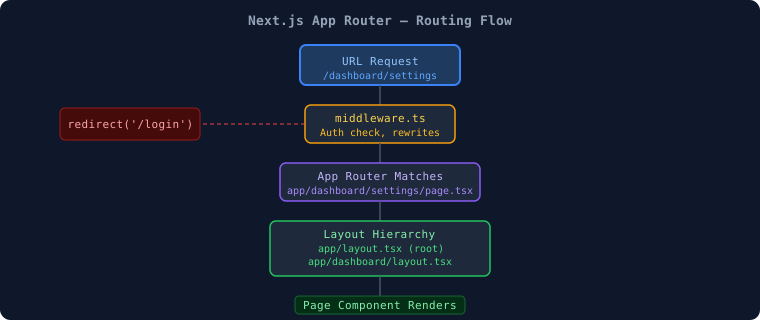
SVG: URL Mapping Diagram
Section titled “SVG: URL Mapping Diagram”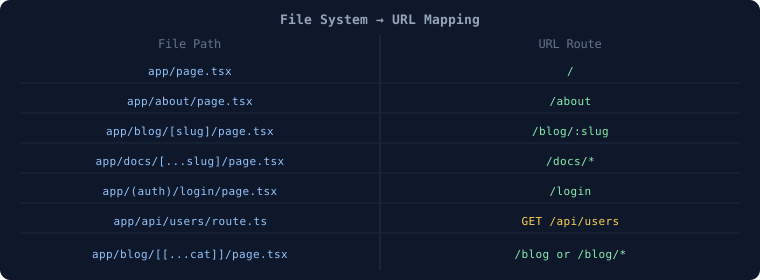
SEO Benefits of Routing
Section titled “SEO Benefits of Routing”- Each page has a unique URL → indexable by search engines
- Server-rendered pages mean bots see full HTML content
layout.tsx+ Metadata API let you set<title>and<meta>per route- Loading states prevent layout shift (better Core Web Vitals)
Common Routing Mistakes ❌
Section titled “Common Routing Mistakes ❌”❌ Using <a href="/about"> instead of <Link href="/about"> (causes full page reload instead of client-side navigation)
❌ Calling useRouter() in a Server Component (only works in Client Components)
❌ Forgetting to add 'use client' when using useRouter (will throw an error)
❌ Not handling the case when a dynamic param doesn't exist (always use notFound() when data is null)
❌ Creating deeply nested routes unnecessarily (use route groups to organize without deep nesting)
✅ Always use <Link> for internal navigation✅ Use redirect() in Server Components, useRouter() in Client✅ Always handle notFound() for dynamic routes✅ Use route groups () to organize without changing URLs📝 Interview Questions — Section 4
Section titled “📝 Interview Questions — Section 4”Beginner:
- How does file-based routing work in Next.js?
- What is the difference between
<Link>and<a>in Next.js? - How do you create a dynamic route in Next.js?
Intermediate:
4. What is the difference between [slug], [...slug], and [[...slug]]?
5. What are route groups and when would you use them?
6. Explain parallel routes and give a real-world use case.
Advanced:
7. How do intercepting routes work and when would you use them (e.g., photo modal)?
8. Explain the difference between redirect() (Server Component) and router.push() (Client Component) in terms of performance.
9. How does prefetching work with <Link> and how would you disable it?