
State Management
State Management in React - Redux & Zustand (Simple Guide)
Section titled “State Management in React - Redux & Zustand (Simple Guide)”What Even Is “State Management”?
Section titled “What Even Is “State Management”?”Imagine you have a shopping cart. The cart total needs to show in the header, the checkout page, AND the cart icon. If all three components each keep their own copy, they’ll get out of sync instantly.
State management = one single source of truth for your data, shared across your whole app.
Without state management: With state management: Header -> its own count Header Cart -> its own count Cart -> [ STORE ] <- one place Checkout-> its own count Checkout (3 copies, all different ) (all read from same store )The Problem - “Prop Drilling”
Section titled “The Problem - “Prop Drilling””Before state management, you’d pass data down through props. This gets painful fast:
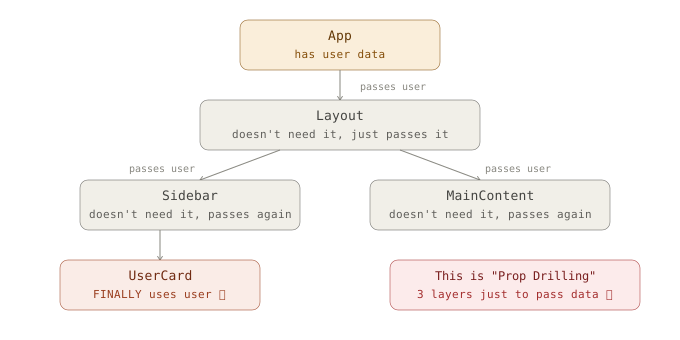
State management solves this - any component can grab data directly from the store without passing through parents.
Solution - The Store Pattern
Section titled “Solution - The Store Pattern”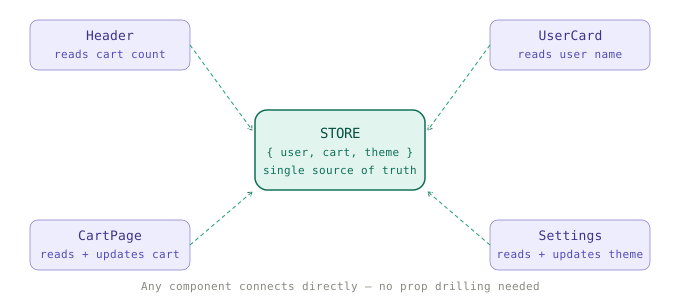
Part 1 - Redux
Section titled “Part 1 - Redux”The Analogy
Section titled “The Analogy”Redux is like a bank. You can’t just reach into the vault and take money. You must:
- Fill out a withdrawal form (Action)
- Hand it to the teller (Reducer)
- The teller updates the vault balance (State)
- Your account shows the new balance (Component re-renders)
The 3 Core Concepts
Section titled “The 3 Core Concepts”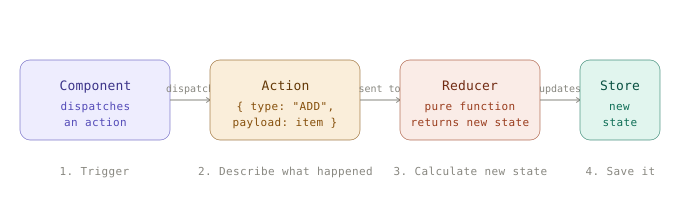
Redux Code - Step by Step
Section titled “Redux Code - Step by Step”Step 1 - Install
Section titled “Step 1 - Install”npm install @reduxjs/toolkit react-reduxStep 2 - Create a Slice (state + actions together)
Section titled “Step 2 - Create a Slice (state + actions together)”import { createSlice } from '@reduxjs/toolkit';
const cartSlice = createSlice({ name: 'cart', initialState: { items: [], total: 0 },
reducers: { // Each function here = one action you can dispatch addItem(state, action) { state.items.push(action.payload); // RTK lets you "mutate" safely state.total += action.payload.price; }, removeItem(state, action) { state.items = state.items.filter(i => i.id !== action.payload); }, clearCart(state) { state.items = []; state.total = 0; } }});
// Export actions (to dispatch) and reducer (for store)export const { addItem, removeItem, clearCart } = cartSlice.actions;export default cartSlice.reducer;Step 3 - Create the Store
Section titled “Step 3 - Create the Store”import { configureStore } from '@reduxjs/toolkit';import cartReducer from './cartSlice';
export const store = configureStore({ reducer: { cart: cartReducer, // access via state.cart // user: userReducer, // add more slices here }});Step 4 - Wrap your App with Provider
Section titled “Step 4 - Wrap your App with Provider”import { Provider } from 'react-redux';import { store } from './store';
ReactDOM.createRoot(document.getElementById('root')).render( <Provider store={store}> {/* <- makes store available everywhere */} <App /> </Provider>);Step 5 - Use in any Component
Section titled “Step 5 - Use in any Component”import { useSelector, useDispatch } from 'react-redux';import { addItem, clearCart } from '../store/cartSlice';
function CartPage() { // READ from store const { items, total } = useSelector(state => state.cart);
// WRITE to store const dispatch = useDispatch();
return ( <div> <p>Total: ${total}</p> {items.map(item => <div key={item.id}>{item.name}</div>)}
<button onClick={() => dispatch(addItem({ id: 1, name: 'Shoes', price: 50 }))}> Add Shoes </button> <button onClick={() => dispatch(clearCart())}> Clear Cart </button> </div> );}Redux Data Flow
Section titled “Redux Data Flow”flowchart LR Comp["🏗️ Component\ndispatch(action)"] --> Action["📤 Action\n{ type: 'cart/addItem' }\"] Action --> Reducer["⚙️ Reducer\n(state, action) → newState"] Reducer --> Store["📦 Store\nSingle state tree"] Store --> Selector["🔍 useSelector\nPicks state slice"] Selector --> Comp
style Comp fill:#7c3aed,color:#fff style Action fill:#4f46e5,color:#fff style Reducer fill:#d97706,color:#fff style Store fill:#059669,color:#fff style Selector fill:#10b981,color:#fffPart 2 - Zustand
Section titled “Part 2 - Zustand”The Analogy
Section titled “The Analogy”If Redux is a bank with formal procedures, Zustand is a piggy bank. You just open it and take what you need. Way less ceremony.
Redux: action -> dispatch -> reducer -> store -> selector -> componentZustand: store -> component (that's it!)Zustand Code - Step by Step
Section titled “Zustand Code - Step by Step”Step 1 - Install
Section titled “Step 1 - Install”npm install zustandStep 2 - Create a Store (everything in one place)
Section titled “Step 2 - Create a Store (everything in one place)”import { create } from 'zustand';
const useCartStore = create((set) => ({ // STATE items: [], total: 0,
// ACTIONS (live right inside the store) addItem: (item) => set((state) => ({ items: [...state.items, item], total: state.total + item.price })),
removeItem: (id) => set((state) => ({ items: state.items.filter(i => i.id !== id), })),
clearCart: () => set({ items: [], total: 0 }),}));
export default useCartStore;Step 3 - Use Anywhere (no Provider needed!)
Section titled “Step 3 - Use Anywhere (no Provider needed!)”import useCartStore from '../store/useCartStore';
function CartPage() { // Pick exactly what you need from the store const items = useCartStore(state => state.items); const total = useCartStore(state => state.total); const addItem = useCartStore(state => state.addItem); const clearCart = useCartStore(state => state.clearCart);
return ( <div> <p>Total: ${total}</p> <button onClick={() => addItem({ id: 1, name: 'Shoes', price: 50 })}> Add Shoes </button> <button onClick={clearCart}>Clear Cart</button> </div> );}That’s it. No Provider, no dispatch, no actions, no reducers. Just a hook.
Redux vs Zustand - Side by Side
Section titled “Redux vs Zustand - Side by Side”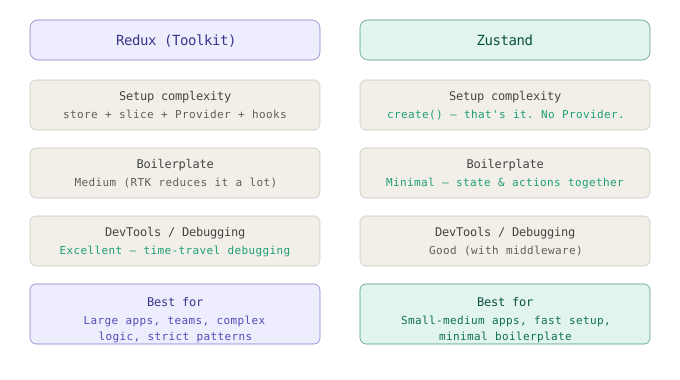
When to Use What?
Section titled “When to Use What?”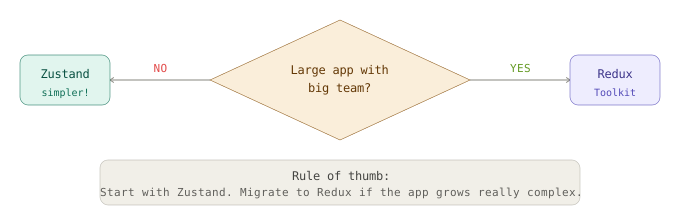
Quick Reference Cheatsheet
Section titled “Quick Reference Cheatsheet”| What | How |
|---|---|
| Read state | useSelector(state => state.cart.items) |
| Trigger action | dispatch(addItem(payload)) |
| Define state + actions | createSlice({ name, initialState, reducers }) |
| Create store | configureStore({ reducer: { cart: cartReducer } }) |
| Wrap app | <Provider store={store}> |
Zustand
Section titled “Zustand”| What | How |
|---|---|
| Create store | create((set) => ({ state, actions })) |
| Read state | useStore(state => state.items) |
| Call action | useStore(state => state.addItem)(payload) |
| No Provider needed | Just import and use the hook anywhere |
Interview Q&A - The Ones They Always Ask
Section titled “Interview Q&A - The Ones They Always Ask”Q: Why not just use useState everywhere?
useState is local to one component. If two components need the same data, you’d have to lift state up - and that causes prop drilling. Stores keep shared data in one place.
Q: What is a reducer?
A pure function: (currentState, action) => newState. It takes the old state and a description of what happened, and returns a brand new state object. It never mutates the original state.
Q: What does “pure function” mean in Redux? Same inputs always give same output. No side effects (no API calls, no Math.random). This is what makes time-travel debugging possible.
Q: Why is Zustand simpler than Redux?
Redux separates actions, reducers, and the store into different concepts. Zustand puts everything (state + actions) inside one create() call, and you access it with a single hook - no dispatch, no Provider, no selectors.
Q: Can you use both in one app? Technically yes, but you wouldn’t want to. Pick one pattern for sanity.
Generated for interview prep - Redux Toolkit + Zustand, React 18+